You can
change the language used on the Windows printer software screens.
- Do one of the following:
- Windows 11: On the right side of
the Windows taskbar, click the up arrow, click the
 icon, and then click on your
product.
icon, and then click on your
product.
- Windows (other versions): Access
the Windows Desktop and right-click the
 icon for your product in the right
side of the Windows taskbar, or click the up arrow and right-click
.
icon for your product in the right
side of the Windows taskbar, or click the up arrow and right-click
.
- Select
Printer Settings.
You see the printer settings window.
- Click
the Utility tab.
You see these options:
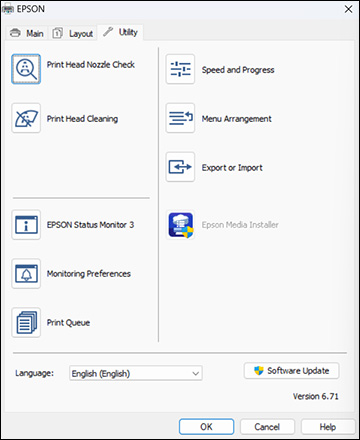
- Select
the language you want to use as the Language setting.
- Click
OK to close the printer software
window.
The printer
software screens appear in the language you selected the next time
you access them.