Before
turning off the projector, shut down any computer connected to it
so you can see the computer display during shutdown.
Note: When
using the A/V Mute feature, the laser is still on. To turn off the
laser, turn off the projector.
-
Press the Standby button on the projector or remote
control.
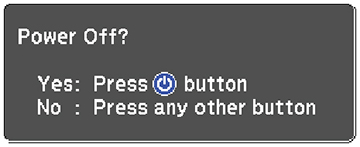
The projector displays a shutdown confirmation screen.Note: If Standby Confirmation is disabled and you press the Standby button on the remote control, the confirmation screen is not shown and the projector shuts off. -
Press the Standby button on the projector or remote
control again. (To leave it on, press any other button.) The
projector beeps twice, the laser turns off, and the Status light
turns off.
Note: With Epson's Instant Off technology, there is no cool-down period so you can pack up the projector for transport right away (if necessary).Note: If the Light Source Calibration setting is set to Run Periodically in the projector's Management menu, light source calibration starts automatically if you turn off the projector and the following conditions are present:
- 100 hours have passed since the last light source calibration.
- You have used the projector continuously for at least 20 minutes.
-
To transport or store the
projector, make sure the Status light is off, then unplug the power
cord.