| Name | Function | |
|---|---|---|
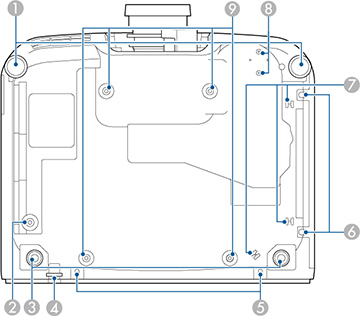
| 1 | Front adjustable feet | When the
projector is set up on a surface such as a desk, turn to extend the
foot to adjust the position of the image.
You can adjust the position of the image by tilting the projector up to 10°. The larger the angle of tilt, the harder it becomes to focus. When you install the optional air filter on your projector, your adjustments may be limited due to interference from other parts. |
| 2 | Safety wire screw holes | Screw hole for securing the ring of the safety wire to prevent the projector from falling from the ceiling or wall. |
| 3 | Rear adjustable feet | When the
projector is set up on a surface such as a desk, turn to extend and
retract the feet to adjust the horizontal tilt.
You can adjust the tilt within a range of ±1.5°. The rear feet are detachable. You can extend the feet by approximately 0.47 in (12 mm) before they detach. |
| 4 | Security cable attachment point | Pass the
theft-prevention wire lock through here and lock it in place.
Warning: Do
not attach the safety wire to this point.
|
| 5 | Cable cover screw holes | The screw
holes for securing the cable cover.
Make sure the cables have been passed through the notch on the base of the cable cover before attaching the cable cover. |
| 6 | Air filter cover screws | Screws to fix the air filter cover in place. |
| 7 | Cable holder | Pass the cable of the optional external camera through here to secure the cable. |
| 8 | Optional external camera attachment points | Use these points to attach the optional external camera. |
| 9 | Ceiling mount attachment points | Use these points to attach the optional ceiling mount when installing the projector on a wall, or mounting the projector from a ceiling. |
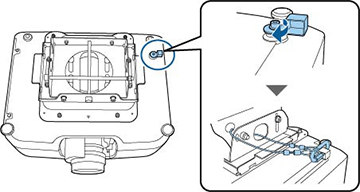
When you use the optional ceiling mount, you can install the safety wire to prevent the projector from falling from the ceiling.
Secure the carabiner using the M6 × 15 mm bolt supplied with the safety wire set, and loop the safety wire through the ceiling mount to secure it as shown.