- Press the
 home button, if
necessary.
home button, if
necessary.
- Select the
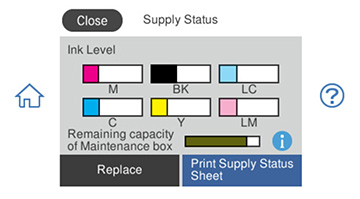
 icon. You see a screen
like this:
Note: The displayed ink and maintenance box levels are approximate. If you see a low ink message, you can continue printing until you see a message to replace an ink cartridge.
icon. You see a screen
like this:
Note: The displayed ink and maintenance box levels are approximate. If you see a low ink message, you can continue printing until you see a message to replace an ink cartridge. - To print detailed status information, make sure paper is loaded in your product and select Print Supply Status Sheet.
- If you want to replace an ink cartridge, select Replace and follow the on-screen instructions.