|
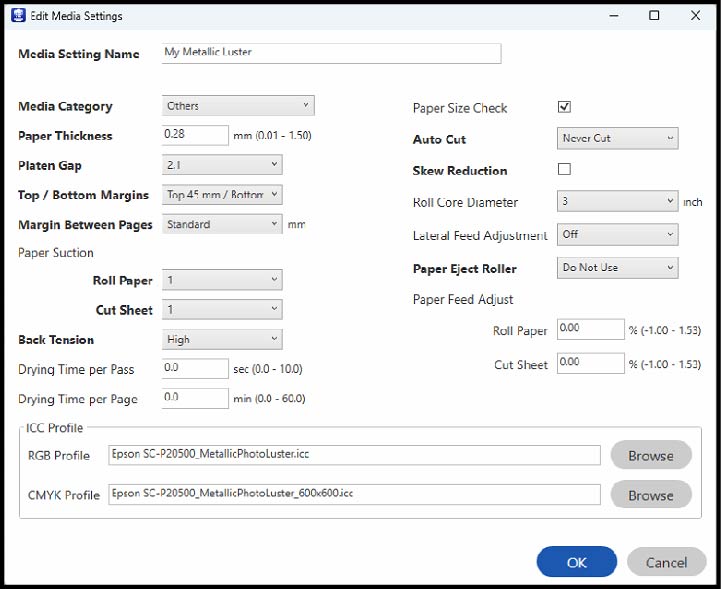
Media Setting Name
|
Change
the media name. |
|
Media Category
|
Set the
media type. |
|
Paper Thickness
|
Set the
thickness of the paper. |
|
Platen Gap
|
Set the
distance between the printhead and the paper; choose a wider
setting if prints are frequently scratched or smudged. |
|
Top/Bottom Margins
|
Select
the margin for the leading/trailing edges of the printed image.
Depending on the paper type and printing environment, colors may be
uneven near the leading edge if the margin is small. |
|
Margin Between Pages
|
Select to
set the margins between pages when printing multiple pages without
using auto cut for roll paper. |
|
Paper Suction
|
Select to
adjust the printer's suction setting; choose lower values for
thinner papers. |
|
Back Tension
|
Adjust
the roll tension setting if paper gets wrinkled during
printing. |
|
Drying Time per Pass
|
Set the
amount of time the printer pauses to allow drying after each
pass. |
|
Drying Time per Page
|
Set the
amount of time the printer pauses to allow drying after each
printed page. |
|
Paper Size Check
|
Select
On to automatically detect the paper
width when paper is loaded.
Select Off when the paper roll is
empty. This allows you to set the paper width before feeding the
paper. |
|
Auto Cut
|
Select
Follow Paper Source Settings to
follow the cut settings in General
Settings > Printer
Settings > Paper Source
Settings > Roll Paper
Setup > Cut Settings >
Auto Cut in the  menu on the printer control
panel. menu on the printer control
panel.
Select Never Cut to cut paper
manually. |
|
Skew Reduction
|
Turn this
off if the front edge of thin paper or softer paper folds. |
|
Roll Core Diameter
|
Select
the paper core size for the loaded roll paper. |
|
Lateral Feed Adjustment
|
Adjust
this setting when Automatic Adjustment cannot be performed or when
banding appears. |
|
Paper Eject Roller
|
Select to
control the paper ejection roller.
Select Auto to use the roller
automatically depending on the type of Epson paper.
Select a Use option to always use
the roller to eject paper.
Select Do Not Use when you are
concerned about damaging the print surface. |
|
Paper Feed Adjust
|
Select
the amount of offset necessary to reduce banding on uneven color in
printouts. |
|
ICC Profile
|
Set an
ICC profile for the media type.
Select an RGB Profile when
printing using the printer driver or select an RGB Profile or CMYK
Profile when printing using a software RIP. |