- Make sure there are no errors on the LCD screen.
- Load a few sheets of plain paper in the product.
- Press the
 home button, if
necessary.
home button, if
necessary.
- Select Maintenance > Ruled Line Alignment.
- Follow the on-screen instructions to print an alignment
sheet.
Note: Do not cancel printing while you are printing head alignment patterns.
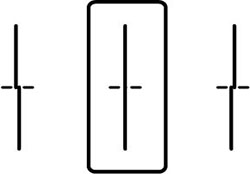
- Check the printed patterns on the alignment sheet and select the number representing the pattern with the least misaligned vertical line on the LCD screen:
- Select Done.