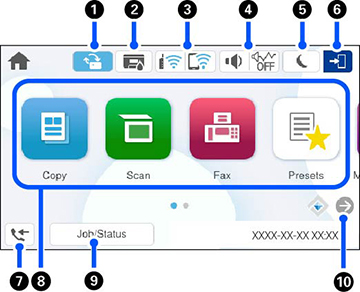
| 1 | Indicates when a firmware update is available |
| 2 | Displays ink and maintenance box status |
| 3 | Indicates network status and accesses network settings |
| 4 | Indicates whether Quiet Mode is enabled |
| 5 | If the icon is not grayed out, enters into sleep mode when selected. |
| 6 | Indicates that the user restriction feature is enabled. |
| 7 | Displays the Fax Data Information screen. |
| 8 | Displays the menu options |
| 9 | Displays ongoing jobs that are on stand by. |
| 10 | Scrolls the screen to the right |