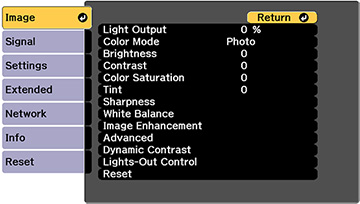
You
can adjust the outline of an image by adjusting its sharpness.
- Turn on the projector and display an
image.
- Press the Menu button.
- Select the Image menu and press
 Enter.
- Select the Sharpness setting and press Enter.
- Choose from the following
options:
- Standard: enhances outlines for
the entire image, including the Thin Line
Enhancement and Thick Line
Enhancement settings.
- Thin Line Enhancement: enhances
details such as hair and clothing patterns
- Thick Line Enhancement: enhances
backgrounds and larger elements
- Use the left and right arrow buttons
to adjust the sharpness values.
- Press Menu or Esc to
exit the menus.