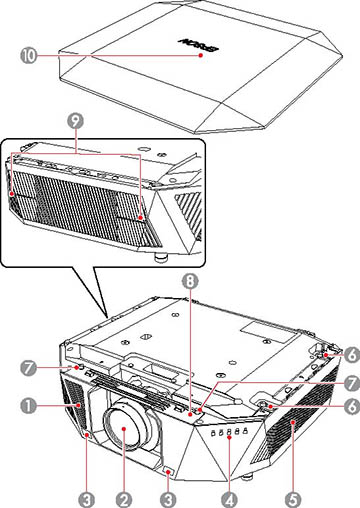
| Name | Function | |
|---|---|---|
| 1 | Air intake vents | Takes in air to cool the projector |
| 2 | Projection lens | Projects images
Do not place any objects or put your hand near
the projection lens. It could cause burns, fire, or the object to
warp because this area reaches a high temperature due to the
concentrated projection light. |
| 3 | Remote receivers | Receives signals from the remote control |
| 4 | Projector status lights | Indicates the projector's status |
| 5 | Air filter cover/intake vent | Takes in air to cool the projector internally |
| 6 | Air filter cover screws | Screws to secure the air filter cover in place |
| 7 | Lens replacement cover screw holes | Attach screws to secure the lens replacement cover in place |
| 8 | Lens replacement cover | Remove while
attaching or removing the lens (ELPLX02S/ELPLX02WS only)
When moving the projector, do not hold the
lens replacement cover. The lens replacement cover may detach and
the projector may fall, which could cause an injury. |
| 9 | Air exhaust vents | Exhaust vent
for air used to cool the projector internally
While projecting, do not put your face or
hands near the air exhaust vent, and do not place objects that may
become warped or damaged by heat near the vent. Hot air from the
air exhaust vent could cause burns, warping, or accidents to
occur. |
| 10 | Vanity board | Covers the top of the projector |