Review the following before loading the media:
- For 0.01 in.
(0.5 mm) or thinner sheet media, Select the
 suction icon to turn on
the suction and hold the media to the flatbed.
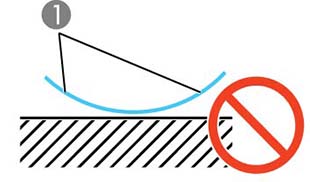
- For flat, board-like media, make sure that the edges (1) are
not raised like in the figure below. If the edge of the media lifts
even when suction has been turned on, use masking tape or something
similar to hold the media to the flatbed.
- For media up to about 0.11 in. (3 mm) thick that is prone to wrinkling or warping due to heat, secure the outer edges of the media to the flatbed with masking tape or something similar.
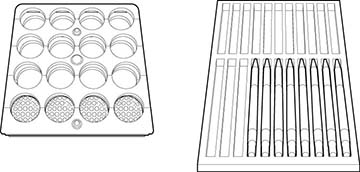
- Light or unstable items, such as spheres, pens, or miniature
toy cars that roll easily, may move when the sensor touches them to
check the media height. We recommend securing them with a jig so
they do not move. Example of jigs:
- You cannot print on surfaces (2) that are perpendicular to the
printhead (1).
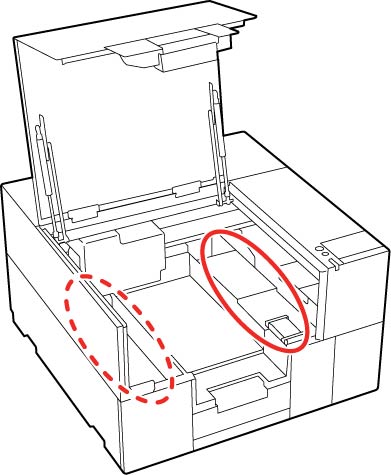
- Do not place any objects in the areas circled in the image
below, or the printer may malfunction. Remember to remove any tape
that was peeled off after use.
- Load the media so the printable surface is flat. If you are loading multiple media pieces, we recommend that the you use a jig to make the spaces in between the pieces the same height.
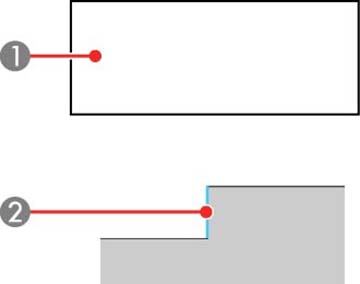
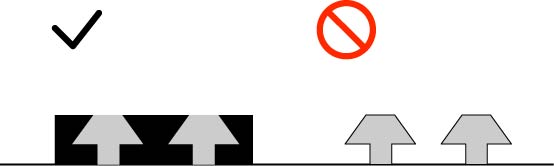
- The figure below shows a view of the printer from the front. If
there are gaps between the media (gray area) printhead nozzles, as
shown on the right, the light from the UV lamp (2) will be
reflected, and the printhead nozzles (1) are likely to clog. Use a
jig (black area) to fill the gaps, as shown on the left.

- The figure below shows the printer from the front. If there are
protrusions on the sides of the media (gray area), use a jig (black
area) to fill the gaps, as shown on the left side of the figure
below. Otherwise, the sensor may get caught in the protrusions and
malfunction.
- Jigs should not be made of transparent materials that reflect light.
- Jigs so large that they extend beyond the edges of the flatbed cannot be used.
- Do not print on media that reflects light strongly, such as a mirror. The UV light may be reflected and cause the nozzles to clog.
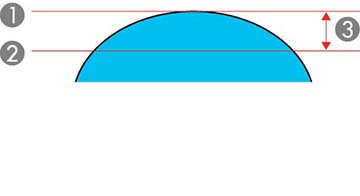
- The printer can print on curved surfaces, but we recommend that
the distance (3) between the highest (1) and lowest point (2) on
the printed surface is 0.07 in. (1.8 mm) or less.