Select Manual (Measurement) if you see banding in the printouts even after performing adjustments with Manual (Standard), if it is difficult to check the patterns for Manual (Standard) due to ink bleeding, or if you want to print with accurate length.
Note:
Make sure the length of loaded media is at least 13.4 in. (340 mm)
when selecting Manual (Standard), or
34.3 in. (870 mm) when selecting Manual
(Measurement).
- Select
the
 Menu
icon > Media Settings >
Print Adjustments > Media Feed Adjustment > Manual (Standard) or Manual (Measurement).
Menu
icon > Media Settings >
Print Adjustments > Media Feed Adjustment > Manual (Standard) or Manual (Measurement). - Review the adjustment patterns and do
one of the following:
- If you selected Manual
(Standard), find the pattern with the least amount of
overlapping or gaps for each group. In the example below, the best
pattern is 0.0%.
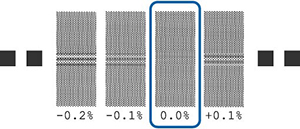
If there are two patterns that have the same level of overlapping or gaps, take their values and divide by 2. In the example below, the value would be -0.05%.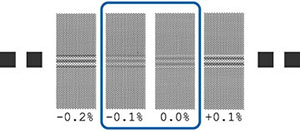
If all of the adjustment patterns have overlapping or gaps, select the pattern with the least amount, then repeat these steps until a pattern with no overlapping or gaps is printed.
If the patterns are difficult to check due to ink bleeding, enter 0.0% and complete the process and then run a Manual (Measurement) adjustment.
- If you selected Manual
(Measurement), cut after the adjustment patterns, spread
them out on a flat surface and measure the distance between the +
symbols in each test pattern as shown.
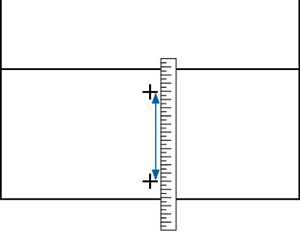
A screen appears for entering values from the adjustment patterns. - If you selected Manual
(Standard), find the pattern with the least amount of
overlapping or gaps for each group. In the example below, the best
pattern is 0.0%.