- Make sure your originals are scanned and reviewed. See the link at the end of this section.
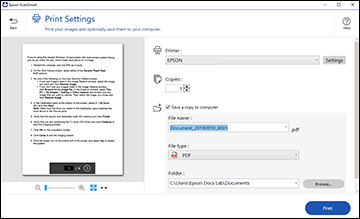
- In the Select Action window, click Print. You see a screen like this:
- Change the settings as
follows:
- Select the Epson printer and change the print settings, if necessary.
- Select the number of copies you want to print.
- If you also want to save a copy of the scanned image to your computer, click the checkbox.
- The document type and scan date for the file name are automatically detected. You can change them as necessary.
- You can save the scanned image in a variety of formats.
- Select the folder on your computer in which to save the file.
- Click Print.