You can edit
or delete any of the contacts or groups on your list.
Press the home button, if
necessary.
Select Fax >
Contacts.
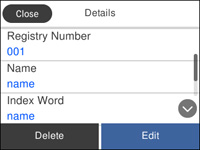
Select the icon next to the contact you want
to edit or delete. You see a screen like this:
Do one of the following:
To delete the
contact or group, select Delete
and select Yes on the
confirmation screen.
To edit the
contact or group, select Edit,
select the item you want to change and make any changes as
necessary. When you are finished editing, select OK.
 home
 icon next to the contact you want
to edit or delete.