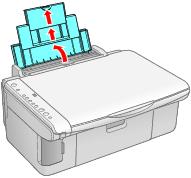
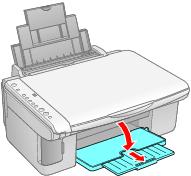
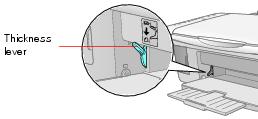
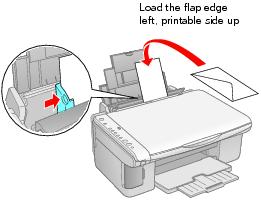
Envelopes 1. Open the paper support and slide out the extensions. 2. Open the output tray and pull out the extension. 3. Set the paper thickness lever to the H position. 4. Load up to 10 envelopes at a time, flap edge left, printable side up, against the right edge guide. Note: For best results, press each envelope flat before loading, or load one envelope at a time. 5. Slide the left edge guide against the envelopes (but not too tightly). 6. Flip the feeder guard back. Select the following settings when printing on envelopes: • Envelope as the paper Type or Media Type setting • The correct envelope size as the Size or Paper Size setting • Landscape as the Orientation setting For instructions on selecting these settings, see: • Printing in Windows • Printing with Macintosh OS X