|
1.
|
Press Setup.
|
|
2.
|
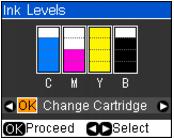
A cartridge marked with an ! is getting low on ink. Follow the on-screen instructions to replace the cartridge, if necessary.
|
3.
|
Press Back as necessary to return to the main screen.
|
You can also check the ink levels using your Windows or Macintosh software. If one of the screens shown indicate that a cartridge is expended, replace the cartridge.