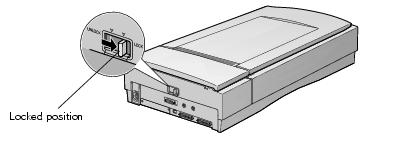
- Make sure the transportation lock on the back of the scanner is in the UNLOCK position.
- If you're using a transparency unit or automatic document feeder, remove it and replace the scanner cover.
- Turn on the scanner and wait until the carriage moves to the home position, as shown. Then turn off the scanner.
- Slide the transportation lock at the back of the scanner to the LOCK position.
- Tape the cover to the scanner.
- Use the scanner's original box, or a similar box with enough packaging material to prevent movement inside the box.
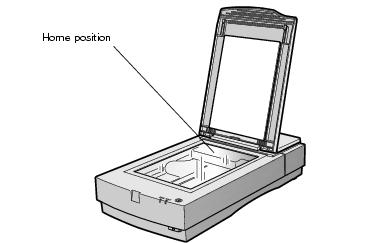
Note: If the carriage doesn't automatically return to the home position, slowly raise the front of the scanner and let the carriage slide to the home position. The carriage won't move automatically to the home position if you have a transparency unit installed; you must remove the transparency unit first.