Double-click the  printer icon in the bottom right corner of your screen (the taskbar).
printer icon in the bottom right corner of your screen (the taskbar).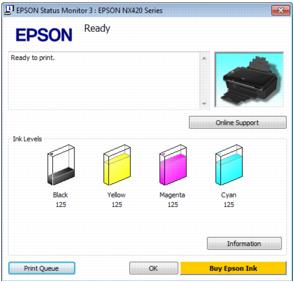
Note:
If any of the ink cartridges installed in the printer is broken, incompatible with the printer model, or improperly installed, Status Monitor will not display an accurate status of the ink cartridge. Be sure to replace or reinstall any ink cartridge indicated by Status Monitor.
If any of the ink cartridges installed in the printer is broken, incompatible with the printer model, or improperly installed, Status Monitor will not display an accurate status of the ink cartridge. Be sure to replace or reinstall any ink cartridge indicated by Status Monitor.
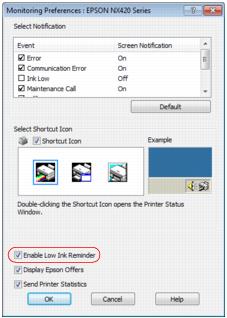
A window may also appear on your computer screen when you try to print when ink is low. This window can optionally display ink offers and other updates from Epson. To disable checking for ink offers or updates from Epson, right-click the  printer icon in the bottom-right corner of your screen and select Monitoring Preferences. Then click the checkbox at the bottom of the screen to deselect it.
printer icon in the bottom-right corner of your screen and select Monitoring Preferences. Then click the checkbox at the bottom of the screen to deselect it.