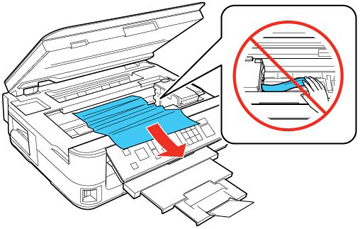
If you see a message that paper has jammed inside the product, try these solutions:
- Cancel the print job from your computer, if necessary.
- Lift up the scanner unit.
- Remove any
jammed paper.
Caution:Do not touch the flat white cable inside the printer.
- Lower the scanner unit.
- Press the OK button to resume printing. If you still see a paper jam message, check the other paper jam solutions.