 |
Assigning Another Windows Program to a Scanner Button
 Assigning a Program With Windows XP Assigning a Program With Windows XP
Assigning a Program With Windows 98SE, Me, or 2000
You can assign the scanner buttons to any Windows program that supports scanner events, such as Photoshop Elements. If you have a compatible program, it will appear in the selection window.
The steps you use depend on the version of Windows you have. See the section for your Windows version below.
Assigning a Program With Windows XP
 |
Click Start > Control Panel > Printers and Other Hardware or Start > Settings > Control Panel.
|
 |
Double-click the Scanners and Cameras icon.
|
 |
Right-click your scanner’s icon and select Properties.
|
 |
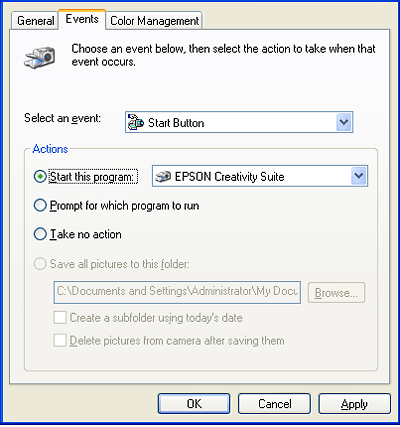
Click the Events tab.
|
 |
In the Select an event list, choose the button to which you want to assign a program.
|
 |
In the Start this program list, choose the program you want to assign. Only compatible programs appear in the list.
|
|  |
Note: |
| |
|
If you want to be given a choice of programs whenever you press the selected button, click the Prompt for which program to run button instead. If you want to disable the button from opening a program, click the Take no action button instead.
|
|
 |
Click Apply, then click OK.
|
Assigning a Program With Windows 98SE, Me, or 2000
|
|
Click Start > Settings > Control Panel.
|
|
|
Double-click the Scanners and Cameras icon.
|
|
|
Do one of the following.
|
|
|
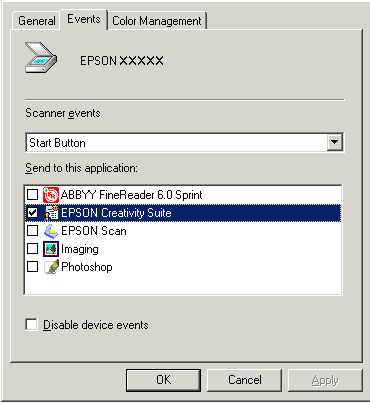
Click the Events tab.
|
|
|
In the Scanner events list, choose the button to which you want to assign a program.
|
|
|
In the Send to this application list, click the checkbox for the program you want to assign. Only compatible programs appear in the list.
|
| |
Note: |
| |
|
If you want to be given a choice of programs whenever you press the selected button, select more than one program in the list. If you want to disable the button from opening a program, click the Disable device events button instead.
|
|
|
|
Click Apply, then click OK.
|
|
Note: |
|
|
With Windows 2000, restart your computer before using the newly assigned scanner buttons.
|
|
| |


 Top
Top