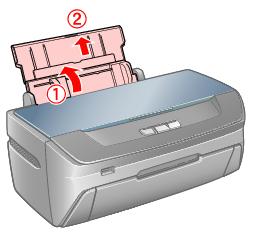
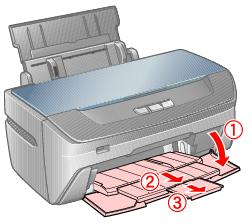
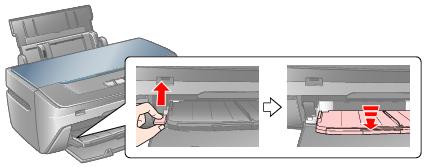
Make sure the front tray is in the paper (lower) position. If it is not, push the tray lever up to reposition the front tray.
Caution:
Before you move the tray lever, make sure no paper or other objects are on the front tray and the front tray is not extended.
Do not touch the front tray when you move the tray lever.
Do not move the tray lever while the printer is printing.
Before you move the tray lever, make sure no paper or other objects are on the front tray and the front tray is not extended.
Do not touch the front tray when you move the tray lever.
Do not move the tray lever while the printer is printing.
Note:
If the tray is in the CD/DVD (upper) position when you turn the printer on, the error lights on the printer will flash. Move the tray to the lower position to clear the error.
If the tray is in the CD/DVD (upper) position when you turn the printer on, the error lights on the printer will flash. Move the tray to the lower position to clear the error.
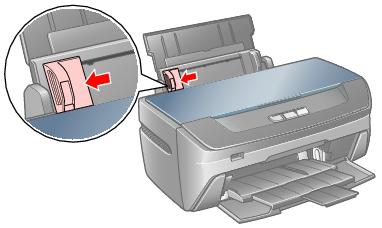

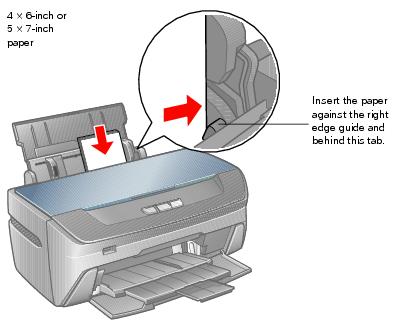
You can load up to 120 sheets of plain paper and up to 20 sheets of photo paper. (See Special Papers for capacity guidelines on other paper types.)
Note:
The type of paper you choose affects the way your printout looks, so be sure to select the correct paper for your job. If you are just printing a rough draft of an image, plain paper is fine. However, for the best results, you’ll want to use one of Epson’s special ink jet papers designed for your printer. For example, your photos will look great printed on Epson Ultra Premium Photo Paper Glossy. See Special Papers for more information.
If you’re inserting a stack of paper, fan the stack and then tap it on a flat surface to even the edges before you insert it.
The type of paper you choose affects the way your printout looks, so be sure to select the correct paper for your job. If you are just printing a rough draft of an image, plain paper is fine. However, for the best results, you’ll want to use one of Epson’s special ink jet papers designed for your printer. For example, your photos will look great printed on Epson Ultra Premium Photo Paper Glossy. See Special Papers for more information.
If you’re inserting a stack of paper, fan the stack and then tap it on a flat surface to even the edges before you insert it.
|
•
|
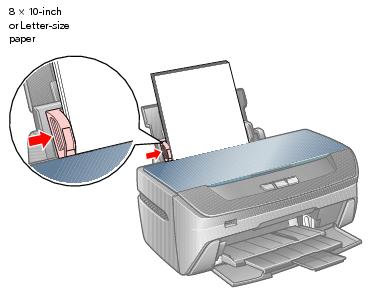
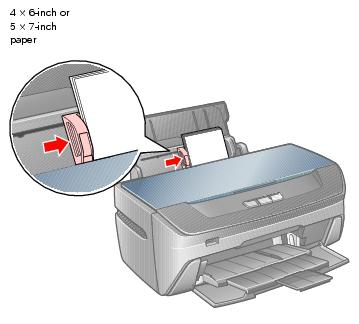
Don’t load paper above the arrow on the left edge guide. Make sure the paper is under the tabs on the left and right edge guides.
|
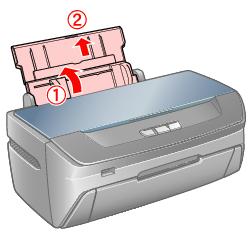
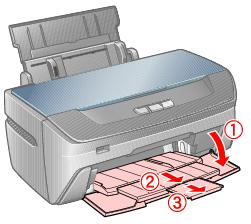
Make sure the front tray is in the paper (lower) position. Follow the instructions if you need to reposition the front tray.
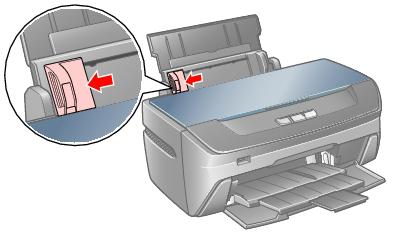
|
4.
|
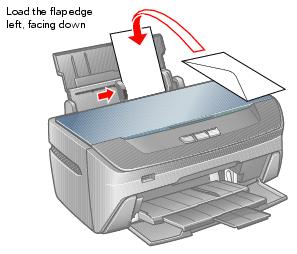
Note:
You may need to press down on the envelopes to flatten them before loading. If print quality declines when a stack of envelopes is loaded, load one envelope at a time.
Do not use envelopes that are curled or folded.
Flatten the flaps and the leading edge of the envelope before loading.
Avoid using envelopes that are too thin, as they may curl during printing.
You may need to press down on the envelopes to flatten them before loading. If print quality declines when a stack of envelopes is loaded, load one envelope at a time.
Do not use envelopes that are curled or folded.
Flatten the flaps and the leading edge of the envelope before loading.
Avoid using envelopes that are too thin, as they may curl during printing.
|
•
|
Envelope as the paper Type or Media Type setting
|
|
•
|
Landscape as the Orientation setting
|
You can achieve good results with most types of plain bond paper. Coated papers, however, provide superior printouts because they absorb less ink.
Epson® provides special papers that are formulated for the ink used in Epson ink jet printers, and recommends these papers to ensure high-quality results.
Note:
When you use special paper, check the package for special instructions regarding the loading and use of the paper.
If the paper is curled, flatten it or curl it slightly in the opposite direction before loading. Printing on curled paper may cause ink to smear on your printout.
Return unused paper to its original package as soon as you finish printing. To keep your printouts looking their best, see Storing and Displaying Your Prints.
When you use special paper, check the package for special instructions regarding the loading and use of the paper.
If the paper is curled, flatten it or curl it slightly in the opposite direction before loading. Printing on curled paper may cause ink to smear on your printout.
Return unused paper to its original package as soon as you finish printing. To keep your printouts looking their best, see Storing and Displaying Your Prints.
Caution:
If your Epson special paper included a cleaning sheet, don’t use it with this printer. The cleaning function performed by the sheet is not necessary with the Epson Stylus Photo R260, and the sheet could jam.
If your Epson special paper included a cleaning sheet, don’t use it with this printer. The cleaning function performed by the sheet is not necessary with the Epson Stylus Photo R260, and the sheet could jam.
|
Epson Premium Presentation Paper Matte Double-Sided
|
||
* The availability of paper types and sizes varies by location.
You can purchase genuine Epson ink and paper from an Epson authorized reseller. To find the nearest reseller, call 800-GO-EPSON (800-463-7766). Or you can purchase online at http://www.epsonstore.com (U.S. sales) or http://www.epson.ca (Canadian sales).
|
Epson Ultra Premium Photo Paper Glossy
Epson Ultra Premium Glossy Photo Paper Epson Premium Photo Paper Glossy
Epson Premium Glossy Photo Paper Epson Premium Photo Paper Semigloss
Epson Premium Semigloss Photo Paper Epson Photo Paper Glossy
Epson Glossy Photo Paper Epson Premium Presentation Paper Matte
Epson Matte Paper Heavyweight Epson Premium Presentation Paper Matte Double-Sided
Epson Double-Sided Matte Paper Epson Ultra Premium Photo Paper Luster
Epson Premium Luster Photo Paper |
|