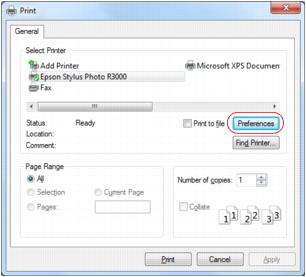
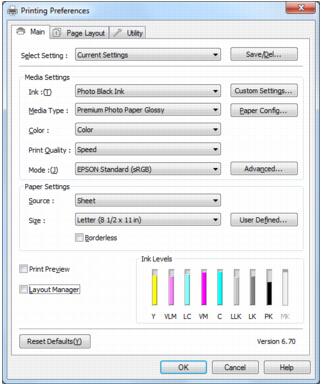
Print From a Program After you open a document or photo in a Windows program, follow these steps to access your print settings: 1. Select the print option in your application. You see a screen like this: 2. Select the name of your product. 3. Click Properties or Preferences. Note:If you don’t have these buttons, click Setup, Printer, or Options, then click Properties or Preferences on the next screen. Your printer setting window opens: Follow the steps in these sections to select settings, print, and control printing: Select Basic Options Change Print Layout Select Paper Configuration Options Select Advanced Black and White Photo Settings Print Your Document or Photo Check Printing Status See also: Customize the Printer Driver Change Default Print Settings