Print From Your Computer : Macintosh Printing

Select Duplex Printing Options
You can select duplex printing options to print on both sides of plain paper.
1.
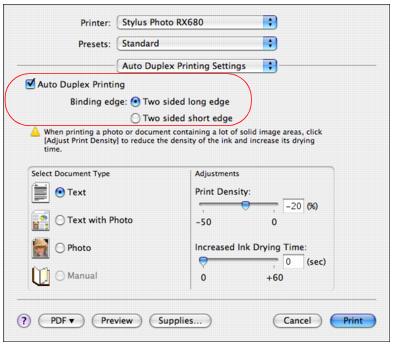
Select Auto Duplex Printing Settings from the pop-up menu.
2.
Click Auto Duplex Printing.
Duplex Printing Settings
Auto Duplex Printing: turns on printing on both sides of the paper.
Binding Edge: Select how your document will be bound.
Note:
If ink is too light or smears in your printout, adjusting the Select Document Type, Print Density, and Increased Ink Drying Time settings.
When you’re finished, you’re ready to print.