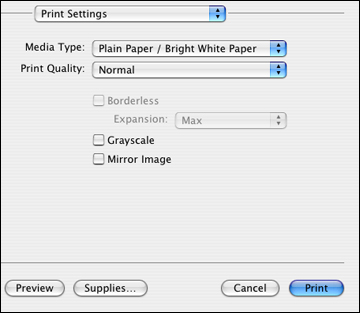
Select the
basic settings for the document or photo you want to print.
Select
the print command in your application.
Note: You may need
to select a print icon on your screen, the Print option in the File menu, or another
command. See your application's help utility for
details.
Select
your product as the Printer
setting.
Note: Select the
TX230 option for your product.
Select
the Copies and Pages settings as necessary.
Note: If you do
not see these settings in the print window, check for them in your
application before printing.
Select
Print Settings from the pop-up
menu.
Select
the type of paper you loaded as the Media
Type setting.
Note: The setting
may not exactly match the name of your paper. Check the paper type
settings list for details.