Note:
The WorkForce 30 Series requires two black ink cartridges. If you install different sizes of black ink cartridges (one high capacity and one standard capacity) in the printer at the same time, the black ink level indicators in the printer software may show one black cartridge being used more quickly than the other. This is normal. Please note that the ink level indicators in the printer software are estimates only.
The WorkForce 30 Series requires two black ink cartridges. If you install different sizes of black ink cartridges (one high capacity and one standard capacity) in the printer at the same time, the black ink level indicators in the printer software may show one black cartridge being used more quickly than the other. This is normal. Please note that the ink level indicators in the printer software are estimates only.
Windows: Double-click the  printer icon in the bottom right corner of your screen (the taskbar).
printer icon in the bottom right corner of your screen (the taskbar).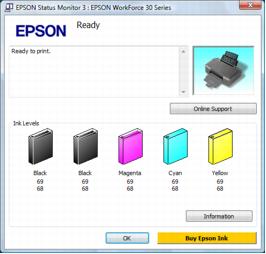
You may also see this screen the first time you try to print when ink is low (if your computer is connected to the Internet):
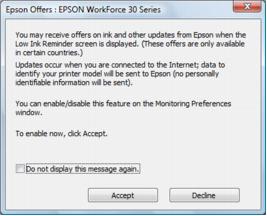
To disable checking for ink offers or updates from Epson, right-click the  printer icon in the bottom right corner of your screen and select Monitoring Preferences. Then click the checkbox at the bottom of the screen to deselect it.
printer icon in the bottom right corner of your screen and select Monitoring Preferences. Then click the checkbox at the bottom of the screen to deselect it.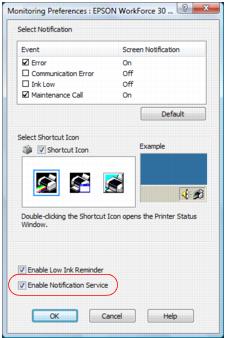
|
1.
|
Open the Applications folder on your hard drive.
|
|
2.
|
Open the EPSON Printer Utility3.
|
|
3.
|
|
4.
|
Select EPSON StatusMonitor.
|
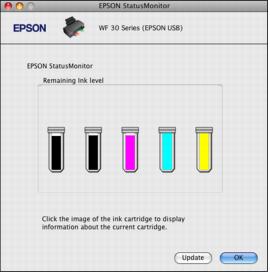
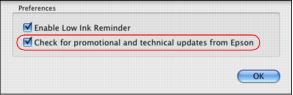
If you’re using Mac OS X 10.5, you may also see this screen the first time you try to print when ink is low (if your computer is connected to the Internet):
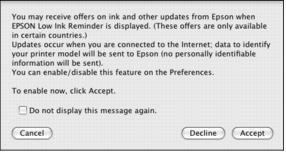
To disable checking for ink offers or updates from Epson, click Accept, select Preferences from the EPSON Low Ink Reminder menu, and click the Check for promotional and technical updates from Epson checkbox to uncheck it.