Selecting Print Settings for Photos Displayed on the LCD Screen
You can change the settings used for printing photos displayed on the LCD screen.
Press the down arrow.
Select
Print Settings
, press
OK
.
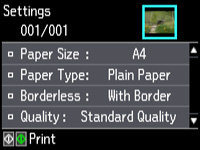
You see this screen:
Select a print setting.
Select an option for the setting.
Note:
To clear any previously used settings, press the
Stop/Reset
button.
When you finish selecting settings, press the
back
button.
Parent topic:
Viewing and Printing Photos
Related references
Print Setting Options - Photo Mode

 back
back