Your printer software automatically checks for updates. You can use the Driver Update Setup menu to change how often the software checks for updates or to completely disable this feature.
|
1.
|
Right-click the
 product icon in the Windows taskbar and select Auto Update Settings. product icon in the Windows taskbar and select Auto Update Settings. |
|
2.
|
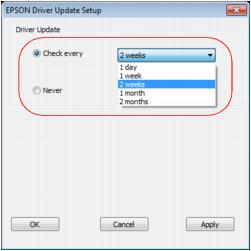
Select how often you want the software to check for updates or choose Never to completely disable the automatic update feature.
|
Note:
If you choose to disable the automatic update feature, it’s a good idea to periodically check for product software updates.
If you choose to disable the automatic update feature, it’s a good idea to periodically check for product software updates.
|
3.
|