You can
print on plain paper envelopes in this size: No. 10
(4.1 × 9.5 inches [105 × 241 mm])
For the WF-7520, you can load No. 10 size envelopes in
Cassette 1 only.
- Close the output tray, if necessary.
- Pull out the paper cassette and remove the paper cassette cover.
- Slide the edge guides outward.
- Slide the edge guide shown below to your envelope size.
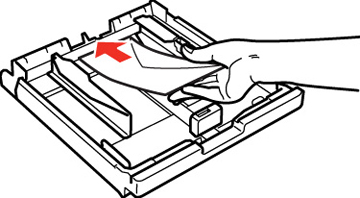
- Load envelopes, printable side down, against the edge guide as shown.
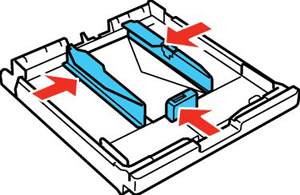
- Slide
the edge guides against the envelopes, but not too tight.
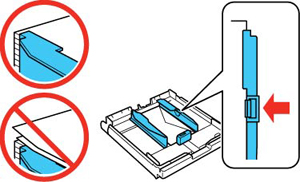
Note: Make sure the envelopes fit beneath the top edges of the guide.Caution:To prevent paper feeding problems, make sure you do not load too many envelopes in the cassette.
- Gently
replace the paper cassette cover and insert the paper
cassette.
Note: The envelopes may slide forward slightly as you insert the cassette. This is normal.
- Extend the output tray and open the paper stopper. Always follow these paper loading guidelines: