|
•
|
Cassette 1 holds a variety of paper types and sizes for photos and documents, from 4 × 6-inch (10 × 15 cm) to legal-size (8.5 × 14 inches or 216 × 356 mm). You can load plain paper or one of Epson’s special ink jet papers.
|
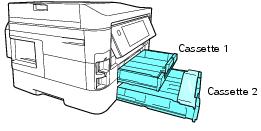
If you’re using plain paper, you can load up to 250 sheets; when using other paper types, be sure to check the recommended number of sheets.
|
1.
|

Note:
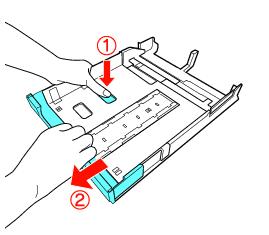
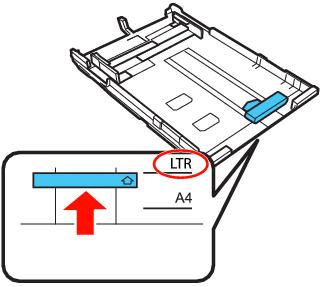
If you are using legal-size paper, extend the paper cassette by pushing the tab and pulling out the end of the cassette as shown below.
If you are using legal-size paper, extend the paper cassette by pushing the tab and pulling out the end of the cassette as shown below.

Tip:
Fan the paper and align its edges before loading.
Load only the recommended number of sheets.
Load paper short edge first, no matter which way your document faces.
Load letterhead or pre-printed paper with the top edge facing the back of the paper cassette.
Do not load paper with holes punched in it.
Do not load transparencies.
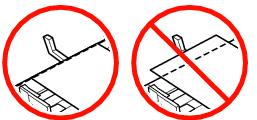
Do not load paper above the arrow marks on the edge guides.
Check the paper package for any additional loading instructions.
Fan the paper and align its edges before loading.
Load only the recommended number of sheets.
Load paper short edge first, no matter which way your document faces.
Load letterhead or pre-printed paper with the top edge facing the back of the paper cassette.
Do not load paper with holes punched in it.
Do not load transparencies.
Do not load paper above the
arrow marks on the edge guides.Check the paper package for any additional loading instructions.
|
5.
|
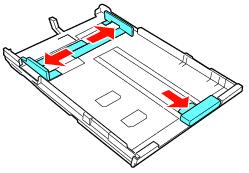
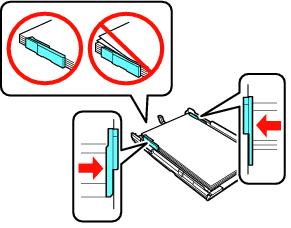
Slide the edge guides against the edges of the paper, but not too tightly. Make sure the paper is under the tabs on the guides.
|
Note:
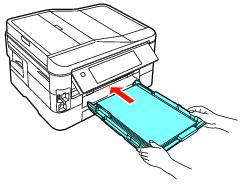
The paper may slide forward slightly as you insert the cassette. This is normal.
Keep the cassette flat as you insert it.
Do not remove or insert the cassette while printing or copying.
The paper may slide forward slightly as you insert the cassette. This is normal.
Keep the cassette flat as you insert it.
Do not remove or insert the cassette while printing or copying.