Running a
product check helps you determine if the printer is operating
properly.
Press
the power button to turn off the
printer.
Disconnect any interface cables connected to your
product.
Load
plain paper in the product.
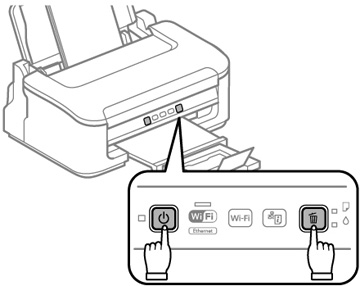
Hold
down the cancel button as you press the
power button to turn the
product back on. Hold down both buttons until the power light begins to flash,
then release the buttons.
The printer begins printing a nozzle check pattern.
Do the
following, depending on the results of the printer check:
If the page
prints and the nozzle check pattern is complete, the printer is
operating properly. Any operation problem you may have could be
caused by your computer, cable, software, or selected print
settings. Check the other solutions in this manual or try
uninstalling and reinstalling your printer software.
If the page
prints but the nozzle check pattern has gaps, clean or align the
print head.
If the page
does not print, the printer may have a problem. Check the other
solutions in this manual. If they do not work, contact Epson.
 power
power cancel