If you’re loading legal-size paper, insert only 10 sheets at a time to prevent paper feeding problems.
Caution:
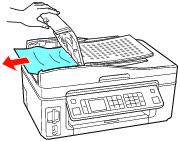
Do not try to remove the paper without opening the ADF cover first, or you could damage the mechanism.
Do not try to remove the paper without opening the ADF cover first, or you could damage the mechanism.
|
2.
|