If you have
a WPS-enabled wireless router, you can use Wi-Fi Protected Setup
(WPS) to connect your scanner to the network.
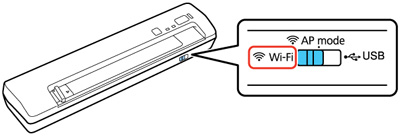
- Set the connection mode switch on the scanner to the Wi-Fi position.
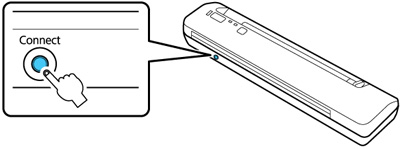
- Press
and hold the Connect button on the
scanner for at least 3 seconds, then release it when the
ready and
 Wi-Fi lights flash
alternately.
Note: If you do not complete this step within 2 minutes, repeat steps 1 to 5.When the ready and Wi-Fi lights on the scanner stay on,
the scanner is connected to the network.
Wi-Fi lights flash
alternately.
Note: If you do not complete this step within 2 minutes, repeat steps 1 to 5.When the ready and Wi-Fi lights on the scanner stay on,
the scanner is connected to the network.