If you need
to move the product through a narrow passageway, remove the media
guide bar.
Caution:
Removing the media guide bar requires at least
two people.
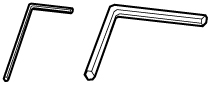
- Locate the two hexagon wrenches that came with your product.
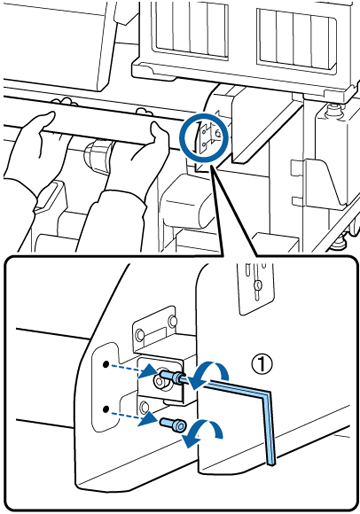
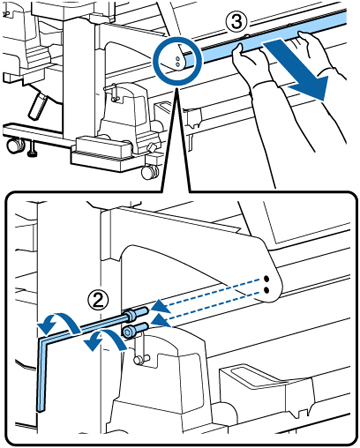
- With one person supporting the media guide bar, and the other using the small hexagon wrench, loosen the four screws securing the media guide bar on both ends as shown. Then pull out the media guide bar.
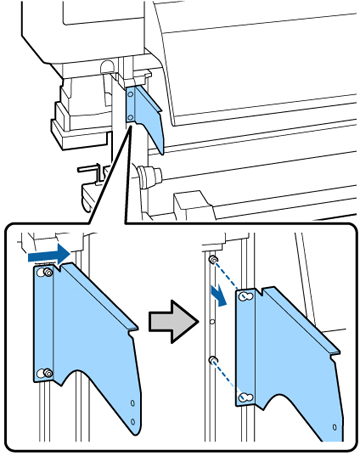
- Using the large hexagon wrench, slightly loosen the two screws securing the left bracket as shown. Rotate the screws approximately two times.
- Slide the bracket to the right and remove it from the loosened screws as shown.
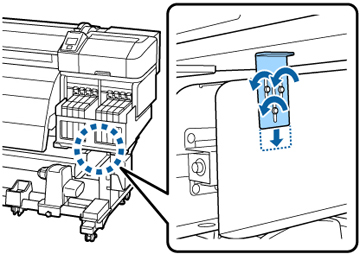
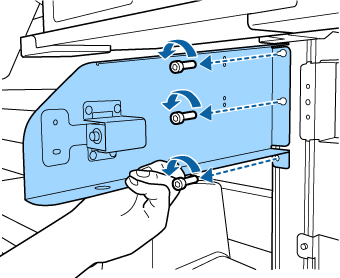
- Using the small hexagon wrench, slightly loosen the three screws securing the right adjustment plate over the tank cover holding plate. Rotate the screws approximately three times.
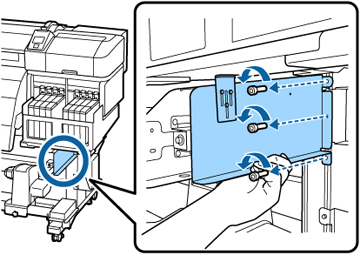
- While supporting the tank cover holding plate, use the large hexagon wrench to remove the three screws securing the plate. Then remove the plate.
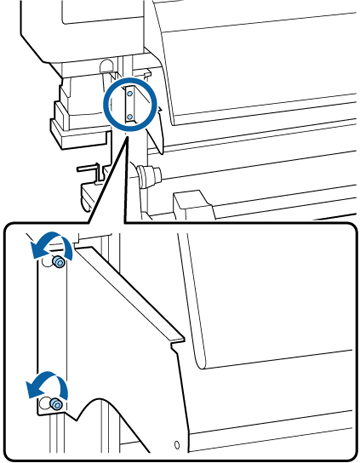
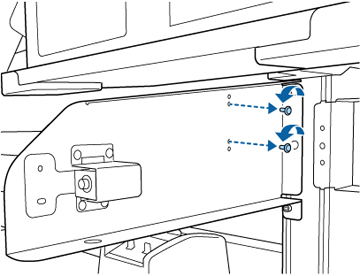
- Using the small hexagon wrench, remove the two screws securing the bracket for the media guide bar.
- While supporting the bracket for the media guide bar, use the large hexagon wrench to remove the three screws securing the bracket. Then remove the bracket.