The battery icon on your watch screen displays the remaining level of power in the battery.
Workout time remaining (approximate)
| Battery icon | ProSense 17 | ProSense 57 |
|---|---|---|

|
8 to 13 hours | 6 to 10 hours |

|
5 to 8 hours | 4 to 6 hours |

|
2.5 to 5 hours | 2 to 4 hours |

|
0 to 2.5 hours | 0 to 2 hours |
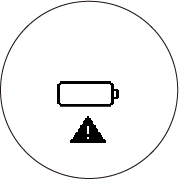
(Press any button to return to the Time screen.)
When the battery is too low, the screen may go blank.
Caution:
Charge your watch at least once every 6 months
when you are not using the watch; long-term storage of the watch
with a low battery may degrade battery performance.
Note: Operation
time also varies depending on the operating environment's effects
on GPS reception and watch settings, such as backlighting.