Your watch
includes a sensor on the back to detect your heart rate
(ProSense57).
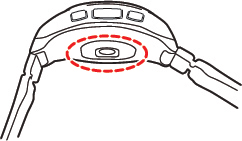
Caution:
The sensor light causes no adverse effects on
your skin, but you should not look directly at the light.
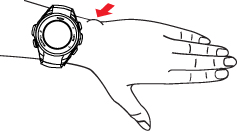
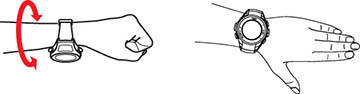
Wear the product snugly around your wrist as shown.
Tighten the watch if your heart rate is not measured correctly.
Note: Do not wear
the product too tight. You should still be able to fit your little
finger under the watch band. If you feel any discomfort, loosen the
wristband.
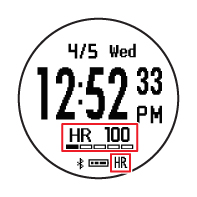
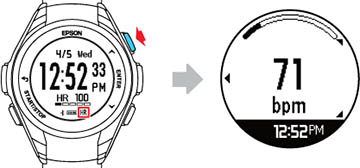
Once the watch has detected your heart rate, it
displays your heart rate, heart rate zone, and the HR icon on the Time screen.
You can also press the  Up button to display the Heart
Rate screen.
Up button to display the Heart
Rate screen.
Up button to display the Heart
Rate screen.
Note: If you see
––– on the display or the
HR icon is flashing, the watch has
not detected your heart rate. Make sure you are wearing the watch
correctly and try again. If your heart rate often reads less than
120 beats while running or 70 beats while walking, you may have a
naturally low heart rate. This can cause incorrect heart rate
measurements. Set the HR Measurement
option to Settings 2 in the Epson
View app to correct the issue.