- When the Paper Size Check setting is turned on, your product automatically detects the left and right edges of the media.
- When the Paper Size Check
setting is turned off, the left edge of the media is determined to
be 44 inches (1118 mm) from the standard position for the
right edge, no matter the width of the loaded media. The printable
area ranges for the media are described in the table below.
Note: If you turn off the Paper Size Check setting, printing may occur outside the edges of your media, causing ink to stain the product. Make sure your print data width does not exceed the loaded media width.
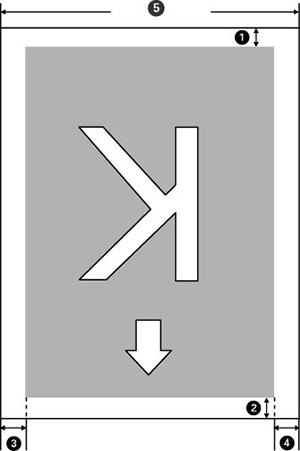
| 1 |
Bottom margin1
You can configure this margin in the RIP software from 0.2 inch (5 mm) or more; if you set it below 0.2 inch (5 mm), it is changed to 0.2 inch (5 mm) to maintain feeding accuracy. |
| 2 |
Top margin1
You can configure this margin in the RIP software from 0.2 inch (5 mm) or more; if you set it below 0.2 inch (5 mm), it is changed to 0.2 inch (5 mm) to maintain feeding accuracy. The margin differs based on how far you pulled the media during loading. |
| 3, 4 |
Left/Right margins2, 3
You select this margin as the Side value of the Roll Paper Margin setting on the product control panel. The default setting is 0.12 inch (3 mm), but you can select from 0.12 inch (3 mm) or 0.6 inch (15 mm). |
| 5 |
Media width
10 to 44 inches (254 to 1118 mm); if Paper Size Check is off, the product assumes this is 44 inches (1118 mm) regardless of the actual width. |
1 The configured margin and the actual print results may differ depending on the RIP software you use. Contact the RIP manufacturer for more information.
2 Depending on the RIP software, you may be able to use it to set these margins. Contact the RIP manufacturer for more information.
3 If the total of the print data width and left and right margins exceeds the printable area, a portion of the print data will not print.