You
need to clean the projector's air filters in the following
situations:
- The filter or vents get dusty.
- You see a message telling you to clean it.
- The projector's Filter light flashes orange.
Caution:
When using the projector in smoky
environments, make sure you replace the air filter after
approximately 240 hours of use. (This is a guideline when using the
projector in an environment with an atmospheric concentration of
ondina oil of approximately 0.000000013%. The air filter
replacement time may be shorter depending on the operating
environment.) Using the projector in a smoky environment may cause
the filter's dust collection function to decline and dust may
adhere to the inside of the projector or the power supply; this may
cause a malfunction to occur.
Note: If the
projector is installed with an air filter facing the ceiling, you
will need to clean the air filters more frequently. If you see a
message to clean the air filter even though you have cleaned it
frequently, replace the air filter.
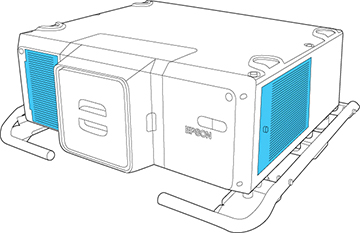
- Turn off the projector, wait for the projector to beep, and unplug the power cord.
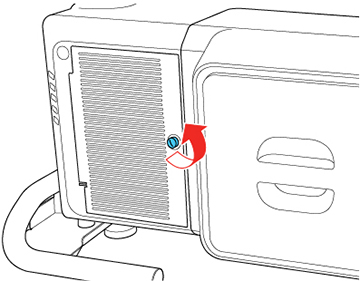
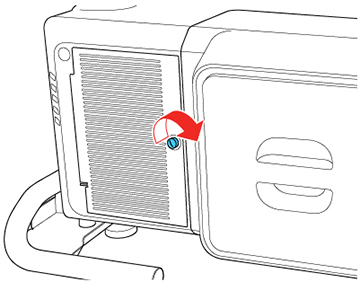
- Loosen the screw securing the air filter cover.
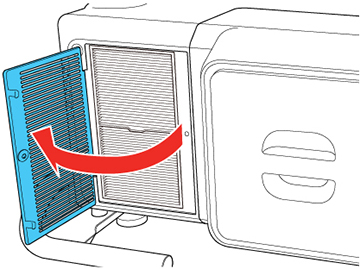
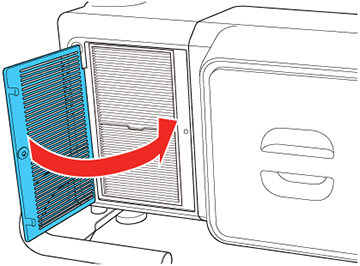
- Open the air filter cover.
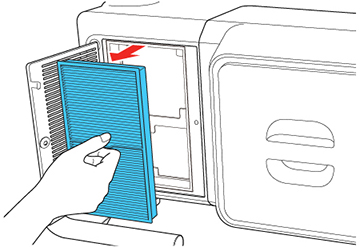
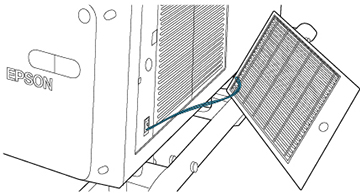
- Pull the air filter out of the projector.
-
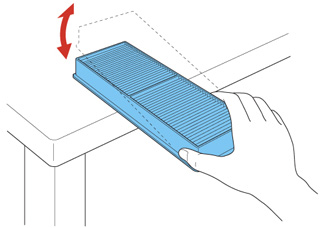
Tap each side of the air filter 4 to 5 times
to shake off any excess dust.
Caution:Do not use excessive force when tapping the air filter, or it may crack and become unusable. Do not rinse the air filter in water, or use any detergent or solvent to clean it. Do not use canned air; the gases may leave a residue, or push dust and debris into the projector's optics or other sensitive areas.
-
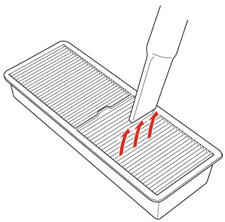
Vacuum the front of the air filter (the side
with the tabs) to remove any remaining dust.
Note: If dust is difficult to remove or the air filter is damaged, replace the air filter.
- Place the air filter back in the projector as shown and push gently until it clicks into place.
- Close the air filter cover.
- Tighten the screw to secure the air filter cover.
- Repeat these steps to clean the other air filters.