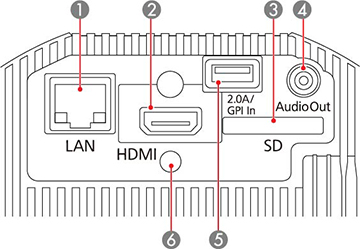
Projector Parts - Interface Panel
1
Network (
LAN
) port
2
HDMI
port
3
SD
card slot
4
Audio Out
port
5
DC Out (2.0A)/GPI In
port (Supplies power to a connected device or connects external devices such as sensors; USB data transfer is not available)
6
Cable clip attachment point
Parent topic:
Projector Part Locations
Related tasks
Connecting to a Computer for HDMI Video and Audio
Connecting to an HDMI Video Source
Connecting to External Speakers
Inserting an SD Card
Connecting to External Sensor Devices
Connecting to a Streaming Media Player
Connecting to Bluetooth Audio Devices
Attaching and Removing the Cable Clips
Using External Sensors
Related reference
Art-Net Channel Definitions
Was this page helpful?
Yes
or
No
.
Privacy Policy
|
Your California Privacy Rights
|
Terms of Use