Clean your
product regularly to make sure that no dust builds up on the glass
scanning surfaces. Dust can cause spots or lines in your scanned
images. Clean the inside of the product every 5,000 scans. You can
check the latest number of scans and set cleaning time
notifications and alerts in the Epson Scan 2 Utility. By default, a
notification is sent after every 5,000 scans.
Caution:
Do not use a hard brush, alcohol, or paint
thinner to clean the product or you may damage it. Do not use oil
or other lubricants inside the product or let water get inside it.
Do not open the product's outer case.
Caution:
Be careful not to get your hands or hair
caught in the gears or rollers when cleaning the inside the
scanner. Otherwise, injury could occur.
Note: Clean inside
your product while it is turned on.
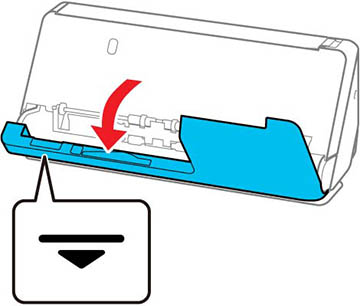
- Open the vertical path cover.
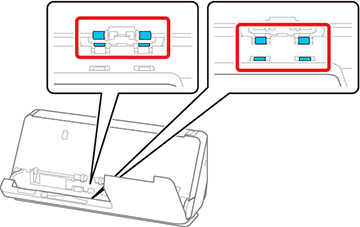
- Wipe the rollers and plastic rollers with a soft, lint-free cloth dampened with a small amount of cleaner or water.
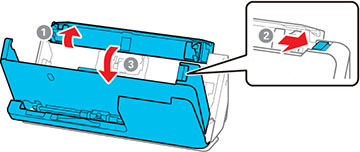
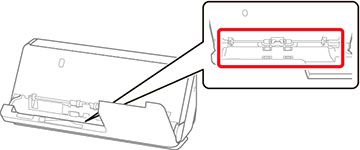
- Open the input tray, and pull the lever to open the scanner cover.
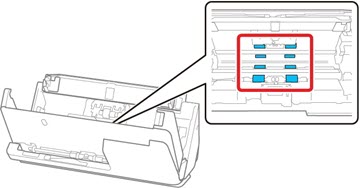
- Wipe the 8 rollers shown with a soft, lint-free cloth dampened with a small amount of cleaner or water.
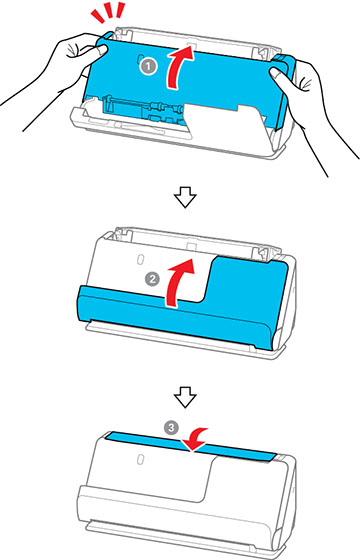
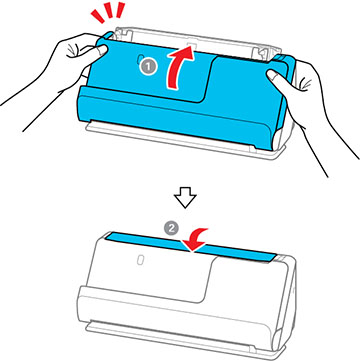
- Close the scanner cover with both hands. Then, close the vertical path cover and then the input tray, in that order. After closing the cover, wait for approximately four seconds before proceeding to the next step.
- Repeat steps 1 to 5 four times. The internal rollers rotate approximately one-quarter of a turn each time the cover is closed. Repeat this step until the entire roller is clean.
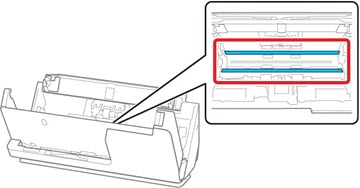
- Open the input tray, and pull the lever to open the scanner cover.
- Use a
genuine Epson cleaning kit or a soft, lint-free cloth to wipe off
any dust or dirt on the glass scanning surfaces and the rollers
inside the scanner cover. If the glass surface is stained with
grease or some other hard-to-remove material, use a genuine Epson
cleaning kit with a small amount of cleaner on the cleaning cloth
to remove the stains. Wipe off all remaining liquid.
Caution:Do not use brushes or hard tools to clean the scanner glass. Any scratches on the glass may affect the scan quality. Do not spray cleaner directly on the scanning surfaces. Be careful not to place too much force on the glass.
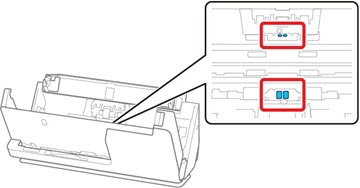
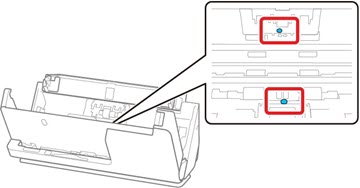
- Use a cotton swab to wipe off any dust
or dirt on the sensors shown here.
Caution:Do not use liquid or glass cleaner on the cotton swab.Note: The ultrasonic sensors do not normally require maintenance. However, if multiple feed errors occur frequently, it is possible that dust that has accumulated around the ultrasonic sensors is being mistakenly detected as a multiple feed error. If this is the case, carefully wipe away any dust with a cotton swab. If you have a blower, such as one used to clean cameras, use it to remove the dust.
Do not spray cleaner directly onto the ultrasonic sensor. Also, be careful not to insert the cotton swab too far into the sensor and make sure no cotton fibers are left behind.
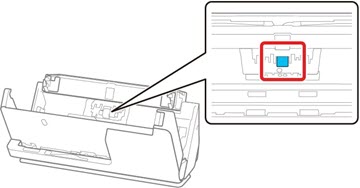
- Open the cover and remove the separation roller.
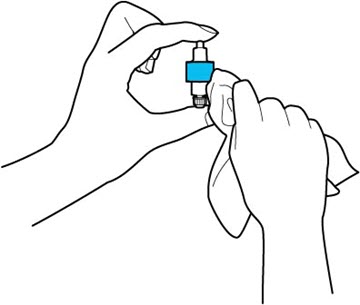
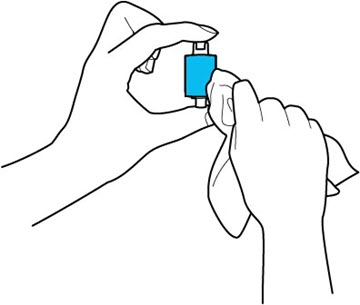
- Wipe off any dust or dirt on the
separation roller using a genuine Epson cleaning kit or a soft,
moist cloth.
Caution:Use only a genuine Epson cleaning kit or soft, moist cloth to clean the roller; using a dry cloth may damage the surface of the roller. Do not spray cleaners directly inside the product; always spray cleaners on a cleaning cloth to slightly dampen the cloth. Wipe off any excess cleaner with a dry, lint-free cloth.
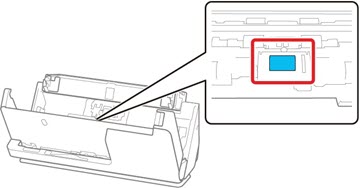
- Open the cover, then remove the pickup roller.
- Wipe off any dust or dirt on the
pickup roller using a genuine Epson cleaning kit or a soft, moist
cloth.
Caution:Use only a genuine Epson cleaning kit or soft, moist cloth to clean the roller; using a dry cloth may damage the surface of the roller.
- Close the scanner cover with both hands. Then, close the input tray.