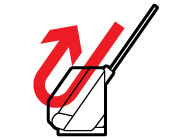
| Vertical path position
|
Use the vertical path position for scanning thin paper,
receipts, or multiple sheets of standard-size originals.
Scanned originals are ejected from the output tray at the top of
the scanner. |
- Standard size originals up to this size: Letter
(8.5 × 11 inches [216 × 279 mm]) or
A4 (8.3 × 11.7 inches
[210 × 297 mm])
- Thin paper (40 g/m2)
- Receipts less than 15.5 inches (393.7 mm) in length
- Business cards
- Mixture of originals
|
| Straight path position
|
Use the straight path position for scanning thick or
long documents, envelopes, passports, cards, and other irregular
size originals.
Scanned originals are ejected from the output slot at the front
of the scanner.
When scanning in the straight path position, make sure there is
enough space in front of the scanner for the ejected originals. If
the scanned image is affected by the originals ejecting below the
product, try placing the product on the edge of a table where the
ejected originals can drop freely. |
- Large size originals (for DS-C330, use a carrier sheet)
- Long paper
- Receipts over 15.5 inches (393.7 mm) in length
- Plastic cards
- Laminated cards
- Booklets (DS-C490 only)
- Passports (for DS-C330, use a passport carrier sheet)
- Picture post cards
- Important or essential originals (in a carrier sheet)
- Envelopes
- Irregular size originals (in a carrier sheet)
|