If your
printouts are grainy or blurry and contain vertical lines or faint
text, you can realign the print head for each platen size and each
ink color.
Note: Before
making any adjustments, select the registered media setting number
you wish to save the settings to. Redo the adjustments if you
change the Platen Gap setting to
Manual.
- If the platen is not in the forward
position, press the
 moveable base button to move it
forward.
moveable base button to move it
forward.
- Confirm the currently selected media settings on the printer's LCD screen.
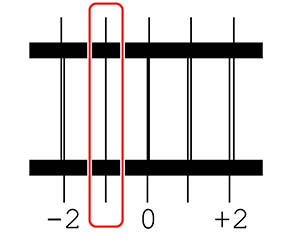
- Look at
each printed check pattern, and choose the number that corresponds
to the thinnest line.
Note: You may see more than one row of patterns.
 home
home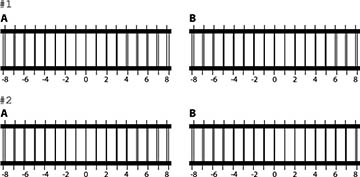
If
image quality has not improved after making adjustments, do one of
the following:
- If you selected Standard to make adjustments, try using Micro Adjust.
- If you selected Micro Adjust to make adjustments, try setting the Platen Gap setting to Manual.
Otherwise, you can try printing the with Uni-Directional (Low Speed) setting enabled in Garment Creator 2. You can also repeat printing or print a job from a USB memory stick and select Uni-Directional as the Head Move Direction setting from the printer's preview screen.