If you will
not use the printer for an extended period of time with the power
off, you must properly prepare it for storage. You must change the
ink packs to cleaning ink packs if the planned period of
non-operation is one month or more.
Caution:
If you do not change the ink packs to cleaning
ink packs before storing the printer, it may be impossible to clear
clogs in the print head when the printer is turned back on. If you
do not print for a long time and do not perform pre-storage
maintenance, turn on the printer at least once every seven
days.
Before you begin the storage operation, gather the necessary
number of cleaning ink packs and a new maintenance box. You may
need new ink and cleaning ink packs depending on the amount of ink
and cleaning liquid remaining. Prepare extra ink and cleaning ink
packs as a precaution.
- Do one
of the following:
- If the printer is in White ink mode and you will not use it for
between two weeks and one month, change the printer mode to Color
ink mode. See the link below.
- If you will not use the printer for one month or longer, go to
the next step.
- Turn on
the printer, if necessary.
- Select
 Maintenance > Keeping Preparation.
Note:
You can also select
Not turning on the
printer for more than 2 weeks on the LCD screen when turning
off the printer.
- Read the
on-screen messages and then select Start.
- Select How
To... on the LCD screen and follow the on-screen
instructions to perform the procedure.
Note:
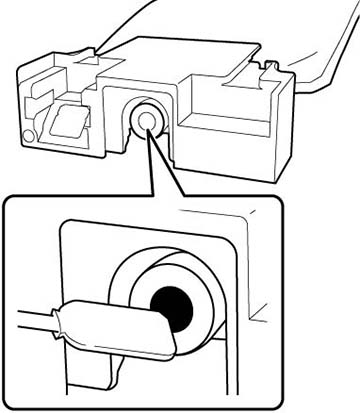
Before storing any ink packs you removed from the printer, clean
off any ink stuck to the ink supply ports. Lightly touch the corner
of a wide cleaning stick from the supplied Maintenance Kit to the
ink supply port to absorb any ink. Use a new cleaning stick for
each color to avoid mixing colors. You do not need to wipe off the
ink and make sure you do not forcefully press or move the cleaning
stick.
- When a
message appears that confirms replacement is complete, turn off the
printer.
- When you
turn on the printer after the storage period, follow the
instructions on the control panel to install and charge the ink
packs and to install a new maintenance box.
Note:
- Select How To... on the screen
to view the steps.
- Have new ink packs on hand as a precaution.
- When White ink mode is selected after restarting the printer,
the density of White ink may be low. See the link below.