- Make sure there are no errors on the LCD screen.
- Load a
few sheets of plain paper in the product.
- Do one of the
following:
- Windows:
Access the Windows Desktop and right-click the
 icon for your product in the right
side of the Windows taskbar, or click the up arrow and right-click
.
icon for your product in the right
side of the Windows taskbar, or click the up arrow and right-click
. - Mac: In the Apple menu or the Dock, select System Preferences or System Settings. Select Print & Fax, Print & Scan, or Printers & Scanners, select your product, and select Options & Supplies. Select Utility and select Open Printer Utility.
- Windows:
Access the Windows Desktop and right-click the
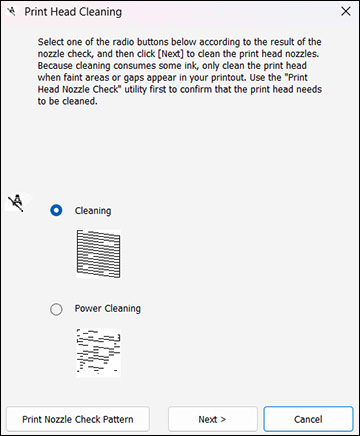
- Select Head Cleaning or Print Head Cleaning. You see a window like this:
- Select the cleaning cycle you want to run, based on the nozzle check pattern and click Next.
- Click Start to begin the cleaning cycle.
You see a message on the computer screen during
the cleaning cycle. The
 power light flashes throughout
the cleaning cycle and stays on when the cleaning cycle is
finished.
Caution:Never turn off the product or open the scanner unit during a cleaning cycle or you may not be able to print.
power light flashes throughout
the cleaning cycle and stays on when the cleaning cycle is
finished.
Caution:Never turn off the product or open the scanner unit during a cleaning cycle or you may not be able to print. - When the cleaning cycle is finished, you can check to see if the nozzles are clean; click Print Nozzle Check Pattern and click Print.
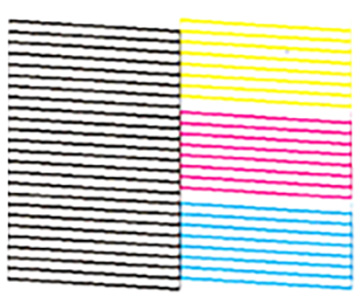
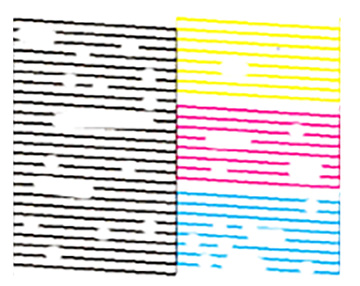
- Check the printed pattern
to see if there are gaps in the lines.
Print head is clean
Print head needs cleaning
Print head needs Power Cleaning
- If there are no gaps, click Finish.
- If there are gaps or the pattern is faint, click Clean to clean the print head again.
- If almost the entire pattern is missing, click Finish and perform a Power Cleaning.

If you still see white or dark lines or gaps in your printouts after repeating the nozzle check and head cleaning three times or Power Cleaning once, turn the product off and wait for at least 12 hours. Run the nozzle check again and repeat the head cleaning if necessary. If print quality has not improved, you can run Power Ink Flushing. If quality still does not improve, contact Epson support.