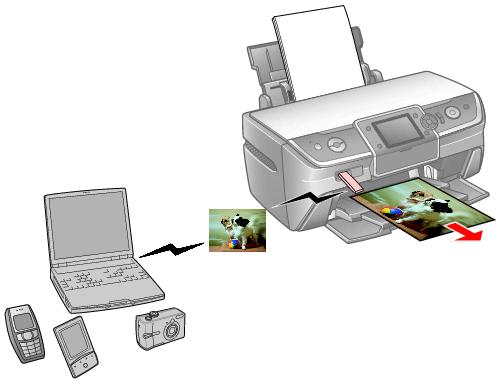
The optional Bluetooth Photo Print Adapter lets you print wirelessly from Bluetooth-enabled devices, such as mobile phones, PDAs, mobile PCs and digital still cameras.
Note:
While the adapter complies with the Bluetooth Specification, it is not guaranteed to work with all devices that have Bluetooth wireless technology. In Bluetooth communication, both the sender and the receiver need to support the same profile (standard for Bluetooth communication). The following profiles are available with this printer: Basic Imaging Profile (BIP), Basic Printing Profile (BPP), Hardcopy Cable Replacement Profile (HCRP), Object Push Profile (OPP).
Always pair your Bluetooth-enabled devices in a safe, private environment.
After pairing your devices, make sure you set your devices to pairing mode.
The communication range of the adapter is approximately 10 meters (33 feet). However, this may vary depending on obstacles between devices, signal quality, magnetic fields, static electricity and electromagnetic interference, software, operating system, reception sensitivity, and antenna performance.
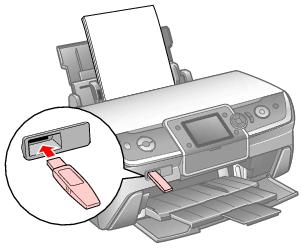
Insert the adapter into the printer's EXT. I/F USB port as shown below.
Caution:
Do not connect the adapter while the printer is operating. Doing so may cause the printer to malfunction.
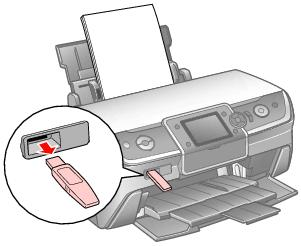
Remove the adapter from the printer's EXT. I/F USB port as shown below.
Caution:
Do not remove the adapter while communicating with another device.
Do not disconnect the adapter while the printer is operating. Doing so may cause the printer to malfunction.
If necessary, use your printer's LCD screen to select settings for Bluetooth wireless communication. You may need to enter a passkey for your printer or turn on encryption, depending on the settings for the Bluetooth-enabled device.
 or
or  to select Bluetooth Settings.
Note:
If the Bluetooth settings on the LCD screen are unavailable, the adapter may not be connected properly. Disconnect the adapter from the printer and reconnect it. See Connecting for instructions.
If you select Pairing as the BT Mode or On as the BT Encryption setting, the passkey must be entered into a Bluetooth-enabled device before it can communicate with and print from the printer.
Note:
Be sure to set a unique passkey before using Bluetooth communication.
To change the passkey, follow the instructions below.
Make sure the Bluetooth Photo Print Adapter is connected to the printer and Bluetooth settings have been made. See Connecting and Disconnecting the Bluetooth Photo Print Adapter and Bluetooth Settings for instructions.
or
to select PictBridge Setup.
Note:
If the Bluetooth settings on the LCD screen are unavailable, the adapter may not be connected properly. Disconnect the adapter from the printer and reconnect it. See Connecting for instructions.
 or
or  to select print settings as necessary.
Note:
These settings remain in effect until you change them, so you only need to set them the first time you print from your Bluetooth device.
The available menu items and default settings will vary according to the profile being used.
Note:
The settings available may vary among Bluetooth-enabled devices. For more information, refer to your device's documentation.
For more information about printing from Bluetooth-enabled mobile phones, PDAs, mobile PCs, digital still cameras, digital video cameras and other Bluetooth-enabled devices, refer to the documentation for both the device and the adapter.