Printer Parts - Control Panel Buttons and Lights
1
The
power
button and power light
2
The
WiFi
light
3
The
Wi-Fi
button
4
The
network status
button
5
The
cancel
button
6
The
paper
light
7
The
ink
light
Parent topic:
Printer Parts Locations
Related references
Product Light Status
 power button and power
light
power button and power
light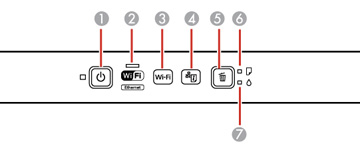
 network status
 cancel
 paper
paper ink
ink