See the guidelines here to determine when to perform
maintenance operations on your product, or replace or refill
consumables. If you need to perform an operation, use the links at
the end of this topic.
Note: You can set
up certain maintenance operations to run automatically using
settings on your product control panel.
Cleaning Schedule
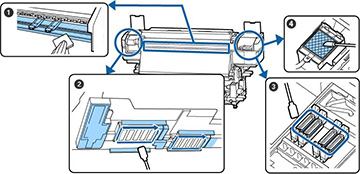
| Number | Area to clean | Frequency |
|---|---|---|
| 1 | Platen heater and media edge plates | Daily |
| 2 | Around the print head | Once a month or when you see a message on the LCD screen to perform head maintenance |
| 3 | Around anti-drying caps | |
| 4 | Around flushing pad | Once a month or as needed |
Consumables and Parts Replacement Schedule
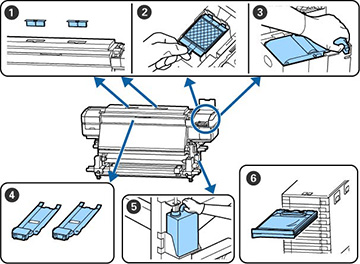
| Number | Part to replace | Frequency |
|---|---|---|
| 1 | Air filters | When you see a message on the LCD screen to replace the part |
| 2 | Flushing pad | |
| 3 | Wiper unit | |
| 4 | Media edge plates | If the plates are deformed or damaged |
| 5 | Waste ink bottle | When you see a message on the LCD screen to replace the part |
| 6 | Ink pack | When you see an ink low or expended message on the LCD screen |
Other Maintenance Schedules
| Procedure | Frequency |
|---|---|
| Remove and shake ink packs | Once every 3 weeks; daily for the White and Metallic Silver ink packs (SC-S80600L only) |
| Check for clogged nozzles | Each time you print or as needed |
| Clean print head | When any clogs are found after a nozzle check |
| Pre-storage maintenance | When you will turn off the printer and not use it for a long time |
| Change color mode
(SC-S80600L only) |
When switching between White and Metallic Silver ink packs or when you no longer need to use either ink type |
| Clean pressure rollers | If dirt from the rollers adheres to your printout |
| Clean inside the front cover | If it is hard to see inside the printer |
| Apply grease to the carriage rod | When a greasing message is displayed on the LCD screen |