You can scan
using a button on your scanner. Your product automatically selects
suitable default scan settings, but you can view or change them as
necessary.
Make sure you installed the scanner
software and connected the scanner to your computer
Place
the original on your scanner.
Press
one of the following buttons on your scanner:
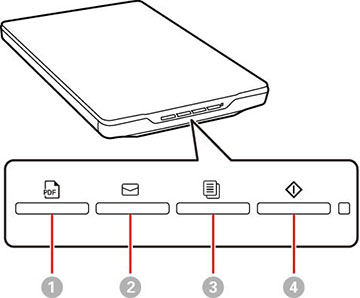
1
The PDF button saves the scanned
image in PDF format.
2
The Email button starts a scan, then
opens the email client on your computer and attaches the scanned
images to an email.
3
The Copy button will scan your
originals and print on a printer connected to the computer.
4
The Start button starts Epson
ScanSmart so you can select the your scan mode, settings and
action.
Follow the on-screen instructions to
save the scanned image.
 PDF button saves the scanned
image in PDF format.
PDF button saves the scanned
image in PDF format. Email button starts a scan, then
opens the email client on your computer and attaches the scanned
images to an email.
Email button starts a scan, then
opens the email client on your computer and attaches the scanned
images to an email. Copy button will scan your
originals and print on a printer connected to the computer.
Copy button will scan your
originals and print on a printer connected to the computer. Start button starts Epson
ScanSmart so you can select the your scan mode, settings and
action.
Start button starts Epson
ScanSmart so you can select the your scan mode, settings and
action.