Use the ink
cleaning solution to clean around the suction cap and print head,
clean the platen without a grip pad, clean the sensor cover, and
clean the encoder strip (carriage scale).
Caution:
Always wear gloves when using ink cleaning
solution, and follow these safety instructions:
- Use the ink cleaning solution to clean only the parts mentioned above or you could damage the printer.
- If cleaning solution gets on to your skin, immediately wash it off using plenty of soap and water. Consult a physician if the skin appears irritated or discolored.
- If cleaning solution gets in your eyes, rinse immediately with water. Failure to observe this precaution could result in bloodshot eyes or mild inflammation. If problems persist, consult a physician.
- If cleaning solution gets in your mouth, consult a physician immediately.
- If cleaning solution is swallowed, do not induce vomiting and consult a physician immediately. If vomiting is induced, fluid may get caught in the trachea which can be dangerous.
- Depending on the usage and storage environment, the ink cleaning solution may change color after opening.
- If you notice that the cleaning solution has changed color or emits a bad odor, stop using it and open a new maintenance kit.
- Close the cleaning solution lid securely after use, and store it out of reach of children. Avoid storing it in locations subject to high temperatures, high humidity, and direct sunlight.
- Do not use ink cleaning solution that has already been used to clean something else. Using dirty ink cleaning solution causes stains.
- Used ink cleaning solution is classified as industrial waste. Dispose of it in the same way as waste ink.
- Wash your hands thoroughly after using the cleaning solution.
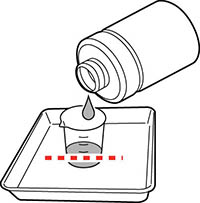
- Place
the cup supplied with the maintenance kit on a tray and pour a
small amount of ink cleaning solution into the cup.
Note: If you are cleaning the sensor cover and encoder strip (carriage scale), pour about 0.15 ounce (5 ml) into the cup (about halfway to the bottom line).
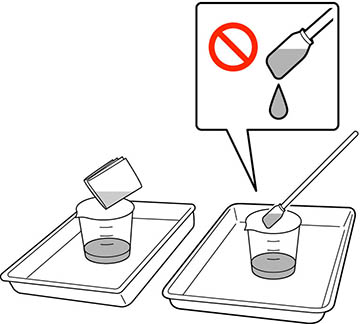
- Place a cleaning swab or cleaning wipe in the ink cleaning solution and let it soak in. Make sure that the solution does not drip from the cleaning swab or cleaning wipe when you remove it from the cup.