Loading Paper


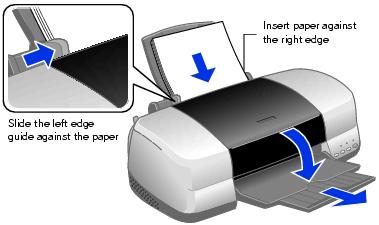
Single Sheets

  1. Insert your paper against the right edge of the sheet feeder.
  2. Slide the left edge guide against the paper (but not too tightly).
  3. Open the output tray and its extension.


Also be sure to:

Roll Paper

You can load the following types and sizes of roll paper:
Paper name
Roll sizes
EPSON Premium Glossy Photo Paper
4 inches × 26 feet
8.3 inches (A4) × 32.8 feet
EPSON Premium Semigloss Photo Paper
4 inches × 26 feet
EPSON Premium Luster Photo Paper
8.3 inches (A4) × 32.8 feet

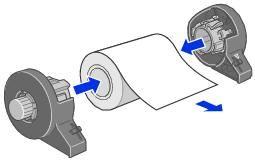
  1. Remove the tape and protective paper from the end of the roll. Then insert the holders into the roll of paper as shown.


  2. Make sure the end of the paper is cut straight across, with 90° corners. If the end is cut diagonally, you may have problems feeding the paper.
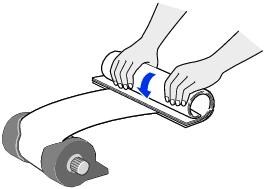
  3. If the paper curls at the end, fold a sheet of paper over the end and roll it backward to uncurl it.


  4. Avoid touching the printable surface of the roll paper.

  5. Remove any paper that's in the sheet feeder at the top of the printer. Then remove the paper support, lower the output tray, and turn on the printer.
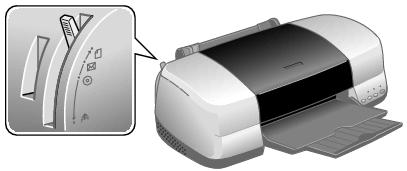
  6. Make sure the paper thickness lever is set to the position.


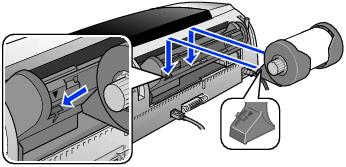
  7. Install the roll paper holders on the printer. Insert the right holder into the far left slot, then insert the other holder into the appropriate slot on the right (either the 4-inch slot as shown, or the 8.3-inch slot further on the right).


  8. Pull out approximately six inches of paper and insert it into the sheet feeder. Then slide the left edge guide against the paper (but not too tightly).
  9. Hold the paper in place and press the roll paper button until the printer feeds the paper automatically.
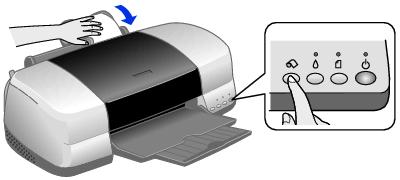

  10. To verify that the paper is loaded straight, open the printer cover and look into the printer.
  11. If the paper is crooked, press the roll paper button and hold it for three seconds to back the paper all the way out.
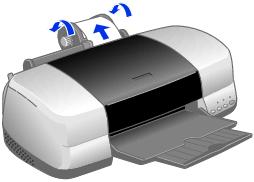


    Then turn the roll paper holder knobs to roll up the paper. Press the roll paper button to clear the paper out error. Repeat steps 7 through 9 to reload the paper.
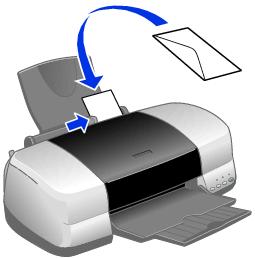
Envelopes

  1. Open the output tray and its extension.
  2. Load up to 10 envelopes at a time, flap edge left, printable side up, against the right edge of the sheet feeder.
  3. Slide the left edge guide against the envelopes (but not too tightly).


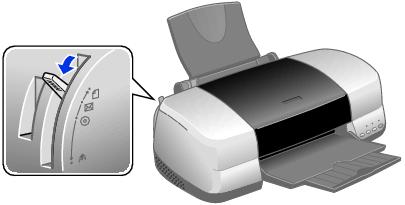
  4. Set the paper thickness lever to the position (remember to set it back to the position when you're done).


  5. Note: For best results, press each envelope flat before loading, or load one envelope at a time.

Select the following settings when printing on envelopes:

For instructions on selecting these settings, see:

Printing in Windows

Printing with Macintosh OS 8.6 to 9.x

Printing with Macintosh OS X

Special Papers

EPSON offers the following special ink jet papers for the EPSON Stylus Photo 900:

Paper name*
Size
Part number
EPSON Premium Bright White Paper
Letter (8.5 x 11 inches)
S041586
EPSON Photo Quality Ink Jet Paper
Letter (8.5 x 11 inches)
S041062
A4 (8.3 x 11.7 inches)
S041061
Legal (8.5 x 14 inches)
S041067
EPSON Photo Quality Ink Jet Cards
A6 (4.1 x 5.8 inches)
S041054
EPSON Glossy Photo Paper or EPSON Photo Paper
Letter (8.5 x 11 inches)
S041141/S041649/S041271/ S041272
A4 (8.3 x 11.7 inches)
S041140
Panoramic (8.3 x 23.4 inches)
S041145
EPSON Matte Paper Heavyweight
8 x 10 inches, BorderFree
S041467
Letter (8.5 x 11 inches)
S041257
Double-Sided Matte Paper
Letter (8.5 x 11 inches)
S041568
EPSON Premium Glossy Photo Paper
4 x 6 inches, BorderFree
S041682
5 x 7 inches, BorderFree
S041464
8 x 10 inches, BorderFree
S041465
Letter (8.5 x 11 inches)
S041286/S041667
Roll (4 inches x 26 feet)
S041302
Roll (8.3 inches x 32.8 feet)
S041376
EPSON Premium Semigloss Photo Paper
Letter (8.5 x 11 inches)
S041331
Roll (4 inches x 26 feet)
S041329
EPSON Premium Luster Photo Paper
Letter (8.5 x 11 inches)
S041405
Roll (8.3 inches x 32.8 feet)
S041408
EPSON ColorLifeTM Photo Paper
Letter (8.5 x 11 inches)
S041500
EPSON Ink Jet Transparencies
Letter (8.5 x 11 inches)
S041064
EPSON Iron-On Transfer Paper
Letter (8.5 x 11 inches)
S041153/S041155
EPSON Photo Quality Self Adhesive Sheets
A4 (8.3 x 11.7 inches)
S041106
EPSON Photo Stickers® Kit
A6 (4.1 x 5.8 inches)
S041144-KIT
EPSON Photo Stickers Refill
A6 (4.1 x 5.8 inches)
S041144
EPSON Glossy Photo Greeting Cards
Letter (8.5 x 11 inches); perforated edges
S041606

* The availability of paper types varies by location.

To order EPSON ink cartridges, paper, and other printing media, contact your dealer or call EPSON at (800) 873-7766 or visit the EPSON StoreSM at www.epsonstore.com (U.S. sales only). In Canada, please call (800) 463-7766 for dealer referral.

To load EPSON ink jet papers, follow these guidelines:
Paper type
Loading capacity
Premium Bright White Paper
100 Sheets
Photo Quality Ink Jet Paper
65 sheets
Photo Quality Ink Jet Cards
30 cards with a support sheet beneath the stack
Glossy Photo Paper or Photo Paper
20 sheets
Panoramic Photo Paper
1 sheet with a support sheet beneath the sheet
Matte Paper Heavyweight
Double-Sided Matte Paper
20 sheets with a support sheet beneath the stack
ColorLife Photo Paper
1 sheets with a support sheet beneath the stack
Double-Sided Matte Paper
Premium Glossy Photo Paper
Premium Semigloss Photo Paper
Premium Luster Photo Paper
Ink Jet Transparencies
Iron-On Transfer Paper
Photo Stickers
Photo Quality Self Adhesive sheets
Glossy Photo Greeting Cards
1 sheet