
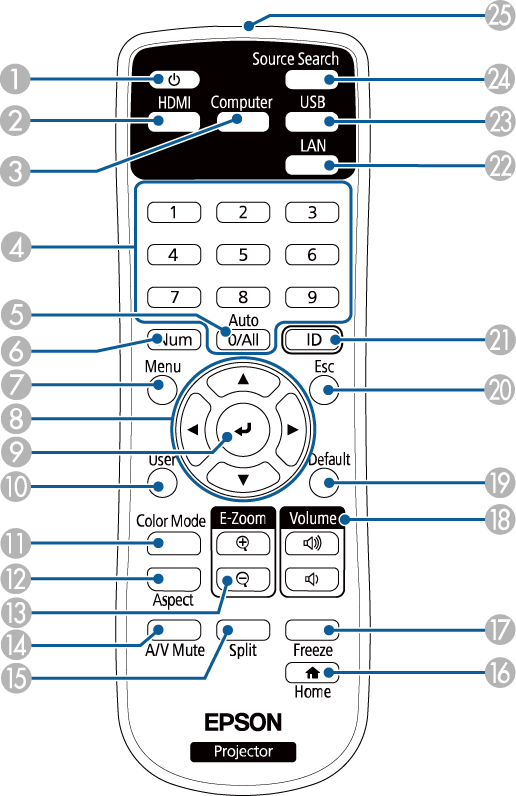
|
Name |
Function |
|
|---|---|---|
|
|
Power button [ |
Turns the projector on or off. |
|
|
HDMI button |
Switches the image source between the HDMI ports. |
|
|
Computer button |
This button is not available. |
|
|
Numeric buttons |
Enters numbers in the projector's menu while holding down the Num button. |
|
|
0/All button |
Allows you to operate all projectors regardless of the Projector ID setting. |
|
|
Num button |
Hold down this button to enter numbers using the numeric buttons. |
|
|
Menu button |
Displays and closes the projector's menu. |
|
|
Arrow buttons |
Selects menu items while displaying the projector's menu. |
|
|
Enter button [ |
Enters the current selection and moves to the next level while displaying the projector's menu. |
|
|
User button |
Performs settings assigned in the User Button setting in the projector's Settings menu. |
|
|
Color Mode button |
Changes the color mode. |
|
|
Aspect button |
Changes the aspect mode. |
|
|
E-Zoom +/– buttons |
Resizes the projected image. |
|
|
A/V Mute button |
Turns the video and audio on or off temporarily. |
|
|
Split button |
Projects two images from different image sources simultaneously by splitting the projected screen. |
|
|
Home button |
Displays and closes the Home screen. |
|
|
Freeze button |
Pauses or resumes images. |
|
|
Volume up/down buttons |
Adjusts the speaker volume. |
|
|
Default button |
Returns the selected setting to its default value. |
|
|
Esc button |
Stops the current function. Moves back to the previous menu level while displaying the projector's menu. |
|
|
ID button |
Hold down this button and press the numeric buttons to select the ID for the projector you want to operate using the remote control. |
|
|
LAN button |
Switches the image source between the network connected devices. |
|
|
USB button |
Switches the image source between the USB Display and USB-A port. |
|
|
Source Search button |
Switches to the next input source. |
|
|
Remote control light emitting area |
Outputs remote control signals. |
 Related Links
 ]
]


 ]
]


