Printing BorderFree Photos
BorderFree Papers
You can print your photos with no margins, extending the image all the way to the edges of the page. Although BorderFree printing is a bit slower (especially near the edges), you get beautiful snapshots or enlargements, without trimming.
BorderFree printing supports the following paper types and sizes:
|
EPSON paper name
|
Sizes
|
Type or Media Type setting
|
|
Photo Paper or Glossy Photo Paper
|
Letter-size
4 × 6 (with or without perforated edges)
A4 (8.3 × 11.7 inches)
Panoramic
|
Glossy Photo Paper
|
|
All Purpose Glossy Paper
|
Letter-size
|
|
Glossy Photo Greeting Cards
|
8 × 10 (with perforated edges)
|
|
Premium Glossy Photo Paper
|
Letter-size
8 × 10
5 × 7
4 × 6
|
Premium Glossy Photo Paper
|
|
Premium Semigloss Photo Paper
|
Letter-size
|
|
Matte Paper Heavyweight
|
Letter-size
8 × 10
|
Matte Paper - Heavyweight
|
|
Photo Quality Ink Jet Paper
|
A4
|
Available for stand-alone copying only; see Stand-Alone Copying
|
Note: For instructions on loading special paper, see Special Papers.
You can print BorderFree photos using your EPSON Stylus CX3200 control panel or your printer software.
To use the control panel, follow the instructions in Stand-Alone Copying and select Border Free as the Copy Mode setting, as described in Type of Copies.
To use your printer software, follow the instructions in the next section.
Using Printer Software
Follow the steps for your operating system below to print BorderFree photos using your printer software.
Windows
- Start your printing application and open your photo file.
- Select Photo or Best Photo as the Quality Type setting.
- Click the Borderless checkbox, then select your paper size as the Size setting.
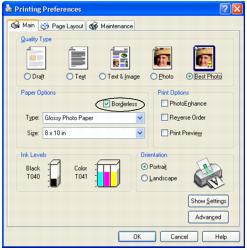
- Select Portrait or Landscape as the Orientation setting.
- Click OK.
- Click OK or Print.
Macintosh
Note: BorderFree printing is not available with Macintosh OSX.
- Start your printing application and open your photo file.
- Click File > Page Setup.
- Click the Borderless checkbox, then select your paper size as the Paper Size setting.
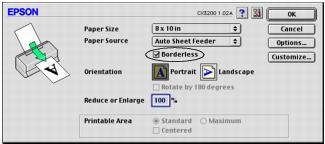
- Select Portrait or Landscape as the Orientation setting.
- Click OK.
- Click File > Print.
- Click Print.